Enable Item Entry in Pocket CowCard
Question: How do I use item entry in Pocket CowCard?
Answer: Pocket CowCard supports the ability to enter item values directly from the Items tab of an animal's CowCard. First, enable item entry from your Pocket CowCard settings in DairyComp, then use the feature in Pocket CowCard:
In DairyComp, enter SERVER\3 to open the Pocket CowCard Server Configuration window.
Open the Pocket CowCard Entry tab:
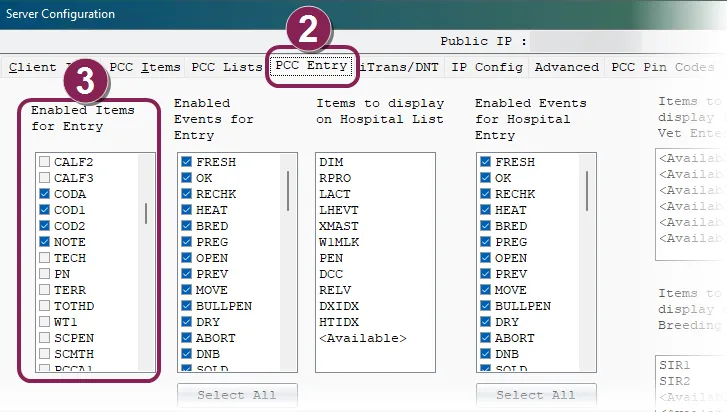
In the Enabled Items for Entry column, check the boxes next to the items you want to enable.
Click OK at the top right corner of the screen to save your changes.
In Pocket CowCard, open an animal's CowCard and tap the Items tab:
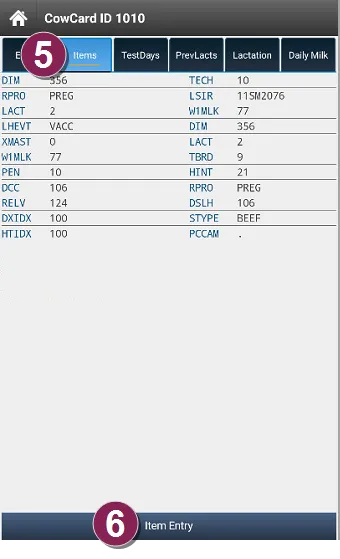
Tap Item Entry at the bottom of the screen.
In the Select Item window, choose the item you want to edit from the drop-down list:
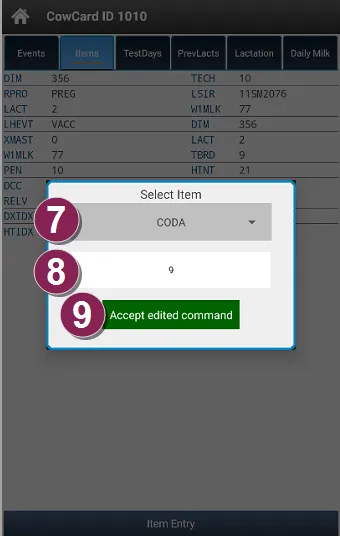
In the blank box, enter the item value.
Click Accept edited command to save your changes.