View Energy Corrected Milk (ECM) Values
2 min
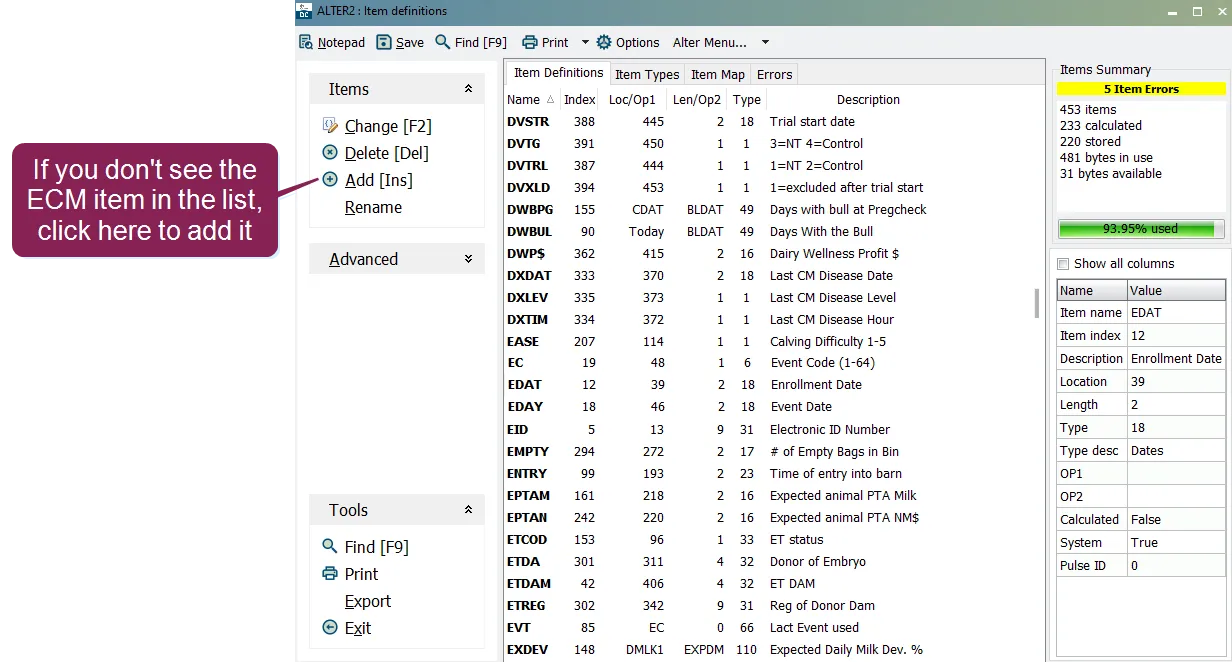
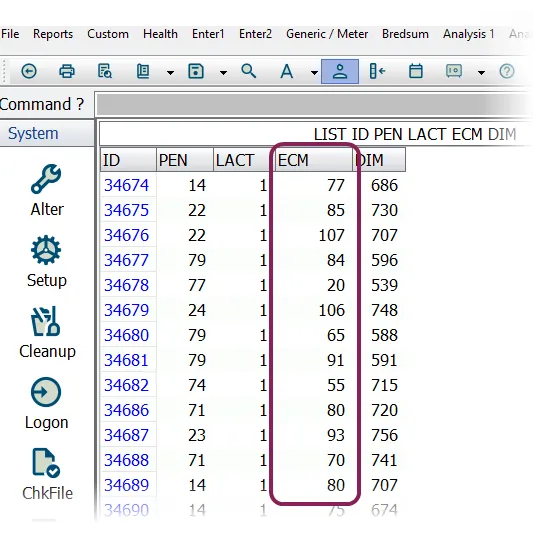
\<font color="#67854e"> question \</font> what is and how can i view it in dairycomp? \<font color="#67854e"> answer \</font> ( ) is a calculation that factors in three different variables—pounds of milk, fat, and protein—allowing producers to better evaluate their herd's productivity and efficiency by adding an item to dairycomp, you can view this calculation in lists and reports is calculated based on test day information, which is loaded into dairycomp through the receive command (see add test day data docid\ cz a7omncp08zkycbw5dc to learn more) combines the three variables mentioned above and then uses a formula to account for a 3 5% fat basis and a 3 2% protein basis to include this calculation in your reports, you'll need to add the item to your dairycomp installation you can then use the item in your dairycomp reports see the topics below to learn more create the item in dairycomp if your dairycomp installation does not yet have the item configured, follow these steps to do so in the command line, enter alter\2 to open the item definitions window if you don't see the item listed in the window, proceed to the next step but if the item is already configured for your system, you can start using it in reports! see view ecm in reports docid\ stmnxzejp59pwvf1 y5mu to learn more click add \[ins] to create a new item, then enter the parameters for the item according to the values below at the end of each sub step listed below, you'll need to click next at the bottom of the window to advance to the next sub step \<font color="#67854e"> item name \</font> enter in this field \<font color="#67854e"> item type \</font> select 85 test day fcm or or mlm from the drop down \<font color="#67854e"> value \</font> enter 1 in this field to use data from the last test day for the calculation \<font color="#67854e"> value \</font> enter 2 in this field for \<font color="#67854e"> description \</font> enter a description such as test days click ok , then click yes to confirm the item you just created view in reports the item is used in dairycomp reports in the same manner as other items; all you need to do is add it to your commands, as in the following example the system will return results that include the value see reports docid\ htjsqn0tlfixvwx2cnmrk to learn more about using items in dairycomp reports note for additional information about and how it works, click here https //vas marketing campaigns com/p/5i4k 8ic/ecm webinar to view an on demand webinar on the subject!