Manage PIN Codes
Question: What does the Pocket CowCard PIN code feature do? How do I manage PIN code access for users on Pocket CowCard Android?
Answer: Starting with the release of DairyComp version 21.5.0, you can manage PIN code access for users on Pocket CowCard Android directly from DairyComp. This allows for better control over who can refresh the latest dairy data on their mobile devices. As Android technology evolves, the way devices are identified can change. Using PIN codes provides a more stable and user-centric method to manage data refresh permissions.
NOTE: PIN codes do not affect Windows Mobile users; those users still need to be managed as usual.
Follow the steps below to manage PIN code access from DairyComp:
In DairyComp, enter SERVER\3 in the command line to open the Server Configuration window.
Select the Pocket CowCard Pin Codes tab.
From here you can set PIN codes for various users.
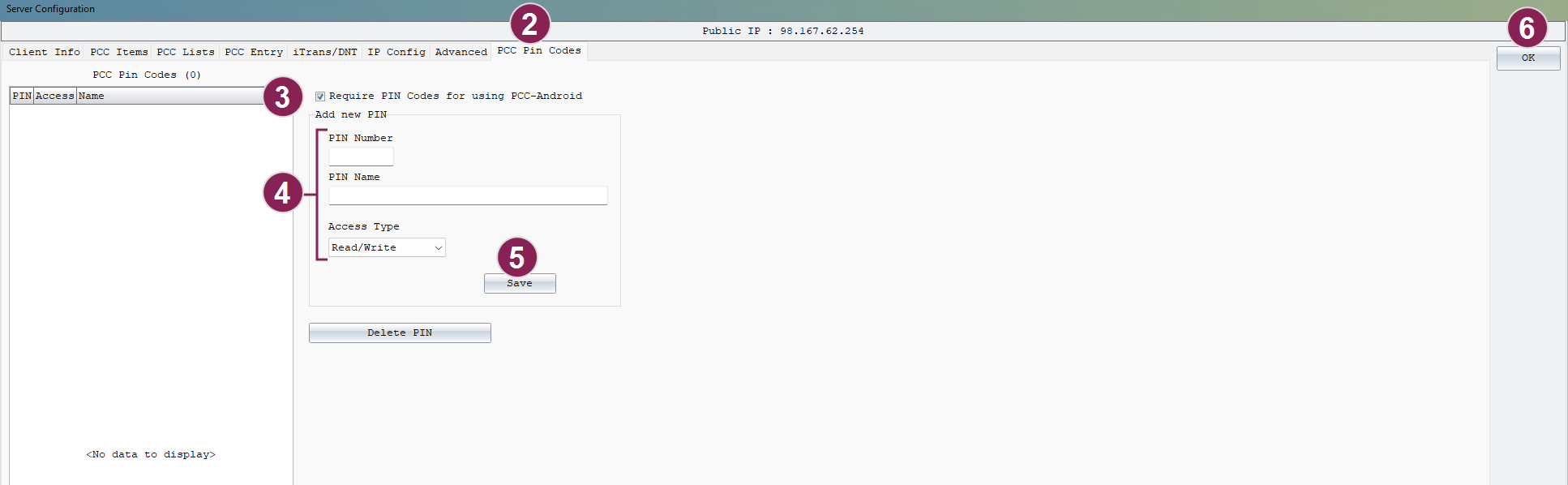
Check the Require PIN Codes for using Pocket CowCardAndroid option.
This ensures that only users with valid PIN codes can refresh data on their Pocket CowCardAndroid devices.
Enter a PIN Number (1 to 999999), PIN Name, and Access Type for each user.
You can assign different PIN codes to individual users/devices or allow one PIN code to be used across multiple users/devices.
Click Save to save the PIN code.
Click OK to save all your changes.
Set a PIN code on your Pocket CowCard device
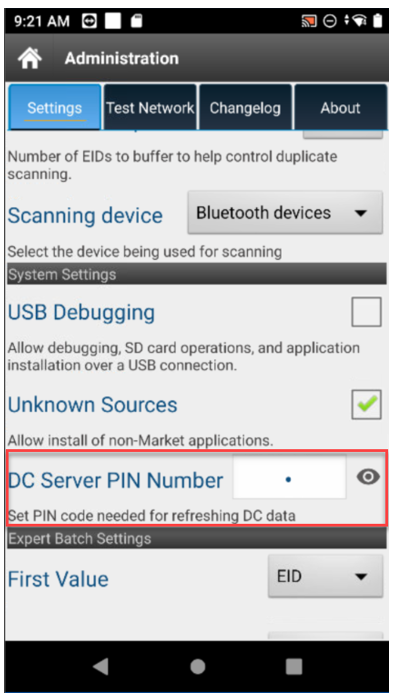
To set the PIN code on a Pocket CowCard Android device, go to the Settings tab and enter the DC Server PIN Number for the applicable user: