Technicians and Breeding Codes
🎓In This Guide, You Will Learn:
- How to add a new technician.
- How to add a new breeding code.
- How to disable technicians.
- How to adjust the technician prompting order with the BRED event.
Technicians
Technicians are individuals who breed cows and DairyComp requires a technician entry with each BRED event. BREDSUM can then be used to evaluate each technician's conception rate, services per conception (SPC), etc.
🗒️ NOTE: Technicians can also be assigned to other teams, such as a hospital team or a maternity team to link the technician to a treatment or calving.
Add a New Technician
Follow these steps to add a new technician:
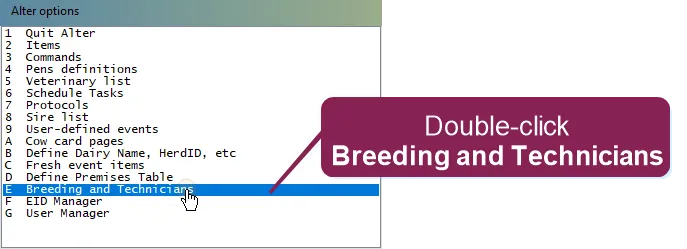
- Enter ALTER on the command line to open the Alter window.
- Select the Breeding and Technicians option to open the Technicians and breeding codes window.
- Select the[F8] Add Tech tab (or use the [F8] function key) to enter the Name and Tech Number.
- In the Name field, enter a unique name.
- In the Tech Number field, enter a unique number.
- Select OK to finish creating the new technician.
- The new technician displays in the green Available Techs box. To make the new technician available for breeding entries:
- Confirm the Breeding team is selected.
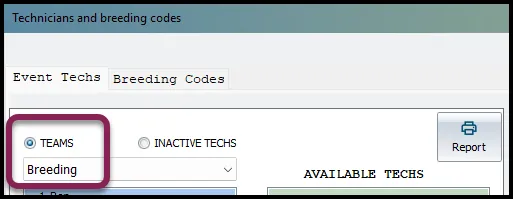
- Click on the new technician in the green Available Techs box.
- Click on the arrow pointing left to move the technician into the blue box.
💡TIPS: Adjust the technician prompting order associated with the BRED event entry by clicking on a technician name in the blue box and using the up or down arrows to reorganize the prompting order.
Disable a Technician
Disabling technicians no longer breeding cows helps keep data entry cleaner and easier.
Follow these steps to disable a technician:
- Confirm the Breeding team is selected as shown above.
- Click on the technician in the blue box.
- Use the right arrow key to move the technician back to the green Available Techs box.
 Follow this link to learn more about Assigning Technicians Teams to Events
Breeding Codes
Breeding codes are used to record the different types of breeding "reasons" and a breeding code is required with the BRED event entry. Breeding codes are used with BREDSUM to help farms evaluate different breeding programs.
Breeding codes can also be customized for your dairy. Below are some common examples:
- S: Standing Heat
- A: Activity system
- D: Double Ovsynch
- R: Resync
- P: Presync/Ovsynch
Adding a New Breeding Code
- Enter ALTER in the command line to open the Alter window.
- Select the Breeding and Technicians option to open the Technicians and breeding codes window.
- Select the Breeding Codes tab.
- Double-click on <available> to add a new breeding code.
- Add a unique, one digit letter A-Z, then click OK to continue.
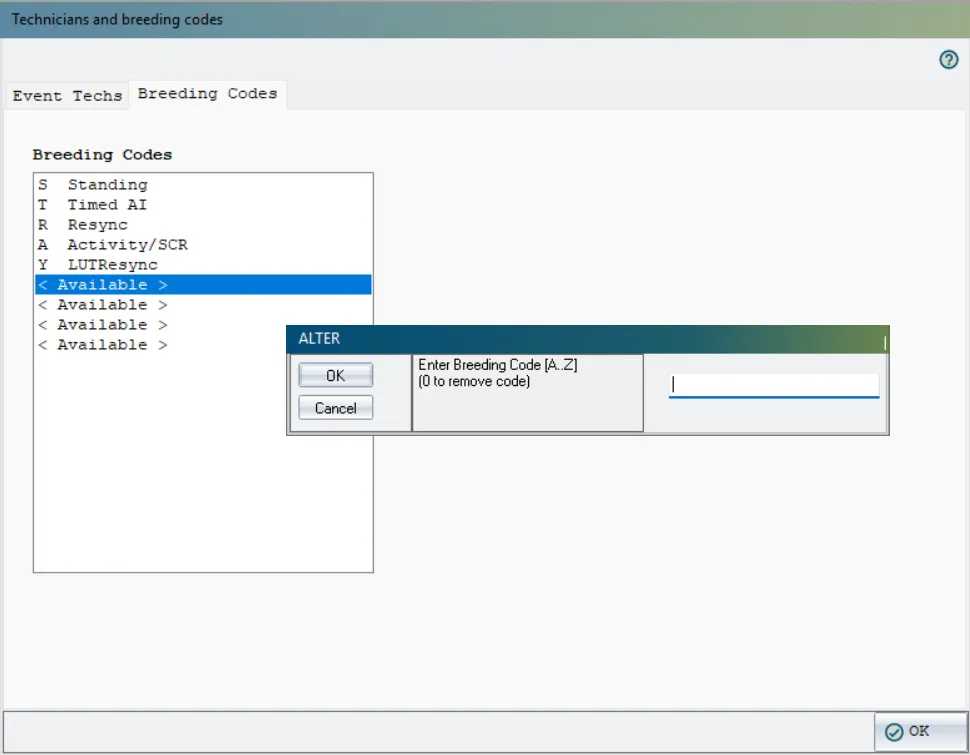
- Enter a description for the new breeding code. Click OK to add the new breeding code to DairyComp. The new breeding code is now available with the BRED event entry.
- Click OK in the bottom right corner to exit when done.
Follow this link to learn more technicians and breeding codes for analysis: BREDSUM Reports
Video: Adding a New Technician
🗒️ NOTE: Use the Expand icon in the bottom right corner to see this video full screen.
Follow this link to continue with the next guide: Matings