BREDSUM Reports
2 min
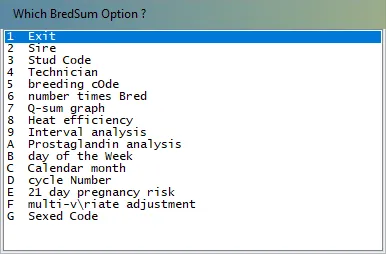
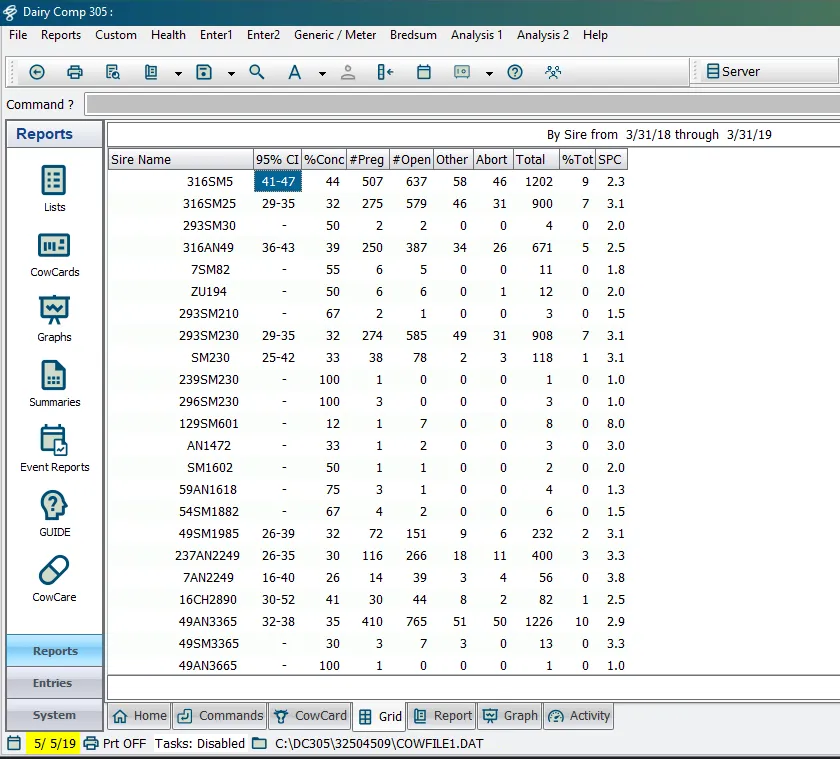
is the dairycomp command used to examine the effectiveness of a breeding program has options to produce most of the traditionally used reproductive statistics and measures, including services per conception, conception rates, days to conception, and q sum conception graphs it also contains options to produce some other less familiar measures such as prostaglandin effectiveness, interval analysis, and q sum for heat detection efficiency most of the outputs create a table that groups individual breedings by categories and displays numbers of breedings and percentage totals in each category there are some predefined options for grouping available (by sire, by stud code, by technician, by breeding code, etc ) you will be prompted to select your preferred grouping option when you run the command further grouping can be done by use of and statements, used in the standard manner of other commands within dairycomp looks at all breedings for animals in the condition list if no condition list is entered, the entire herd over the past 365 days, including dead cows, is used see the topics below to get started with reports run a report start by typing the command followed by any switches docid\ xyinqirjavg7x2 1rpyab and any or statements for instance, the following command runs a report for heifers/youngstock \<font color="#6b7280">\</font> after entering the command, dairycomp will prompt you to select a grouping option; double‑click to select the option when including switches in the command, consider the following information if you prefer to use a different time frame than the entire past year, the switch \d ( \d ) will prompt for the starting date and the ending date of the time interval to be examined to look at only the last 6 months, use \d180 to specify the number of previous days to view from the current day by default only runs the reports for cows using \y only runs reports for heifers/youngstock cows and youngstock cannot be combined in one report see switches for a full list of bredsum switches docid\ xyinqirjavg7x2 1rpyab you can use in the command click here to see a bredsum report example docid\ xyinqirjavg7x2 1rpyab report example the below report example is displayed in the grid window after selecting the sire grouping option note that examines the "breeding result code" set for each breeding; these codes are set by the different events such as , , and itself the result codes are \<font color="#67854e">p\</font> pregnant \<font color="#67854e">o\</font> open \<font color="#67854e">r\</font> rebred \<font color="#67854e">c\</font> post conception breedings \<font color="#67854e">e\</font> estimated breedings (used in natural service herds when no known breeding date can be identified) non‑ai breedings (bull or no sire) are listed separately from the ai breedings and are not included in the ai calculations report columns report columns are described below \<font color="#67854e">95% ci \</font> 95% confidence interval range \<font color="#67854e">%conc \</font> conception risk from breedings with known outcomes \<font color="#67854e">#preg\</font> count of inseminations with know outcome of pregnant \<font color="#67854e">#open\</font> count of inseminations with know outcome of open \<font color="#67854e">other\</font> inseminations with unkown outcomes or 2 day re breeds \<font color="#67854e">abort\</font> count of inseminations that resulted in an abortion \<font color="#67854e">total\</font> total inseminations (preg + open + other) \<font color="#67854e">%tot\</font> percentage of total inseminations in this category \<font color="#67854e">spc\</font> services per conception (inverse of conception rate) switches when you enter the command, you can add any of the switches listed in the table below for example, you can enter \s to run the by sire report after you press enter, you may also be prompted to select an additional option for the report double‑click on an option to run the corresponding report the table below defines each of the options expand each description for details \<font color="#f3f4f6">switch\</font> \<font color="#f3f4f6">description\</font> \a by all bulls ai \b by times bred \c by calendar month \d by select date range \e by 21 day insemination rate \f by order straws \g by breeding time gap \h heat detection \i by interval analysis \j by activity level \k by hour of the day \m by stud code \n by breeding cycle \o by breeding code \p by pen of the event \pg by prostaglandin analysis \q by q sum graphs \r by week of conception \s by sire \t by ai technician \u use bullpen breeding only \v denote voluntary waiting period \w by day of week \x cross table analysis \y include youngstock \z by breed of sire \\ by semen type syntax this section summarizes the syntax used with the command in the command line and outlines the options available through either use of switches or by selections from a menu \<font color="#67854e">\</font> will accept conditional statements using followed by item constraints these statements can be used in an identical manner to statements used with other commands ( , , etc ) in dairycomp common examples would include limiting analysis to adult cows ( >0), to heifers ( =0), to certain breeds ( =h), or to specific freshening groups ( >120 <180) \<font color="#67854e">\</font> statements can be used with in an identical manner to statements used with other dairycomp commands common examples would be , stage, or see command line docid\ u nbrveqbf6nzsp1bc9e0 for more information on using conditional statements in your commands