Refresh a Client
1 min
Question: My DairyComp client is not communicating with the DairyComp server. How do I re-establish a connection?
Answer: You can refresh your DairyComp client to re-establish its connection with the server. Follow these steps to continue:
- Locate your DairyComp server IP address, and write it down or copy and paste it. If you do not have your IP address, follow the steps in Find your DairyComp IP AddressFindDC-IPaddress.htm to obtain it.
- Open your DairyComp client.
- Enter SERVER in the command line and press Enter to view the Settings window (see example in the next step).
- In the Host field, type in or paste the IP address.
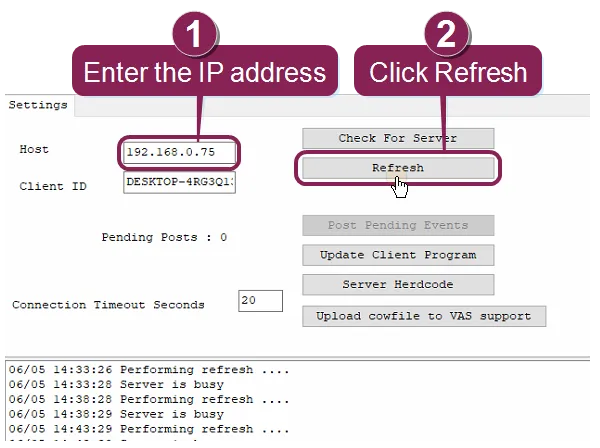
- Click Refresh.
If your DairyComp server does not connect to DairyComp, check your firewall or anti-virus program to ensure that DairyComp servers are not being blocked.