Generate Vet Lists
2 min
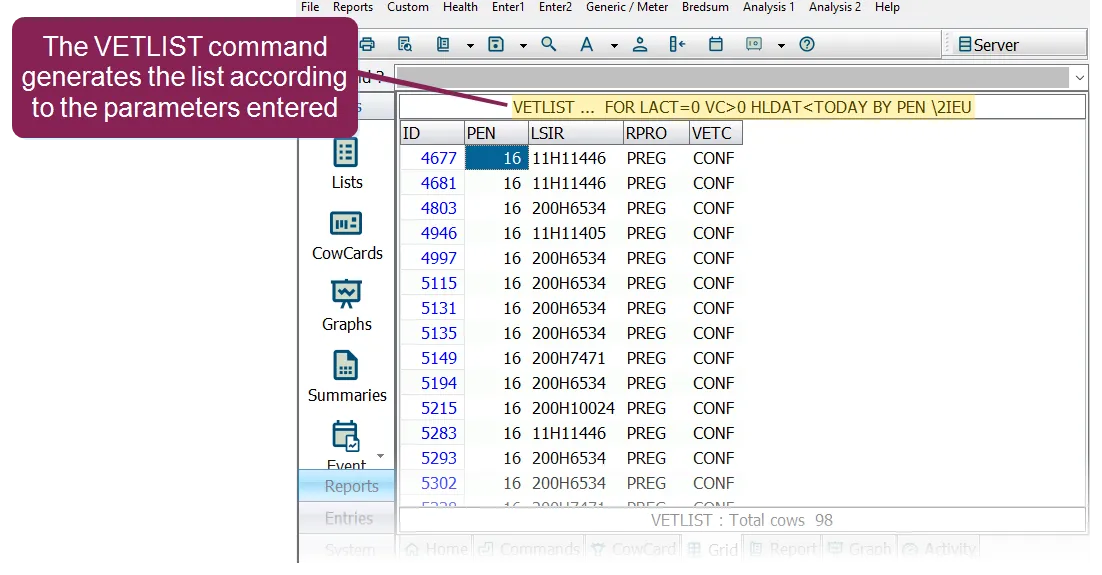
vet lists are generated in dairycomp using the vetlist command you can enter the vetlist command directly in the command line, though it's more likely that you'll run it through a menu shortcut if you run the vetlist command in the command line, you'll need to enter the parameters for the command (i e , tell dairycomp which animals to add to the list) if you run a vetlist command from a menu shortcut, it will already include these parameters for example, a menu shortcut such as vlist might run the following command \<font color="#6b7280">vetlist id pen lsir rpro vetc for lact=0 vc\>0 by pen\</font> this command string includes the following the vetlist command itself a list of dairycomp items to include in the list id , pen , rpro , and vetc the conditions animals must meet to be included in the list for lact=0 and vc>0 a method for sorting the animals in the list by pen note vlist is a commonly used dairycomp menu command for generating vet lists your own dairycomp system may includes variations of this command abbreviation such as vlistb, vlisth, and so on once the vetlist command is executed, the system searches through the cowfile for animals that match the command parameters and scans those animals for vet codes the animals with vet codes that indicate an exam is needed are added to the vet list creating multiple vet lists you can create multiple menu shortcuts for different types of vet lists, each with a different name this is useful when different groups of animals are examined on different veterinary visits for example, let's say you want the veterinarian to examine all of the animals in the first five pens to do this you can create a vet list to define the vet codes, the items to include on the vet list, and a condition statement for the pens ( for pen=1 5 ) then, you can create a similar vet list for a subsequent veterinary visit to examine the animals in pens 6 through 8 ( for pen=6 8 ) each vet list would have a different name/menu shortcut what if you wanted the vet to examine animals based on their reproductive status? just as with the pens example above, you can create a vet list using the appropriate vet codes for instance, to put both fresh and no heat animals on the vet list, you could specify for vc=1 8 vc=5 3 the first set of vet codes includes animals with vet codes 1 through 8 but the second set of vet codes excludes animals with vet codes 3 to 5 (which all indicate possibly pregnancy) alternatively, to include animals just for pregnancy exams, you can create a vet code parameter that includes the preg and codes, as in for vc=3 4 see standard dc305 vet codes docid\ x19x6ohp4phkdvs1muwc0 for definitions of the various dairycomp vet codes sorting vet lists normally, vet lists are sorted by animal id numbers you can change this by adding a by statement to the command for example, to sort by pen by pen \<font color="#f97316">important\</font> changing the sort order of a vet list will affect the order in which vet exam data is entered see enter result codes and remarks docid\ g9zwtygqv mak8uoyn2kr to learn more