Understanding Breeding entries on the CowCard
🎓In This Guide, You Will Learn:
- Identify breeding outcome codes.
- Identify the technician associated with a breeding.
- Identify the breeding code associated with a breeding.
- Use the hover feature to see detailed breeding information.
Breeding entries are displayed on CowCards and it's important to understand the information associated with each entry.
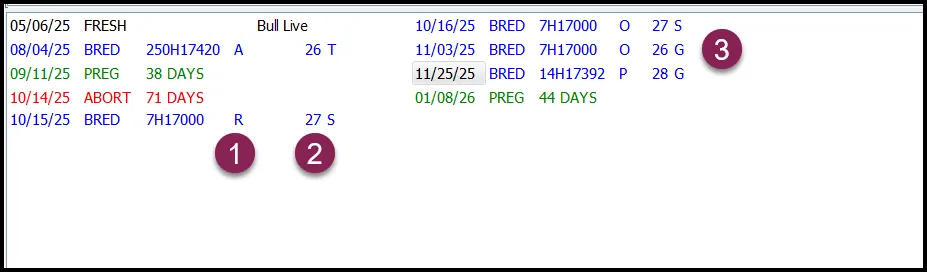
1 Breeding Outcomes
2 Technician Number
3 Breeding Code
1 Breeding Outcomes
P = The breeding resulted in a pregnancy.
O = The cow did not settle to the breeding and was found open or had a repeat breeding.
A = The cow settled to the breeding but later aborted.
R = A second BRED event was entered within 48 hours.
- The letter A is the outcome for the 8/4/25 breeding as an ABORT event was entered on 10/14/25.
- The letter R is the outcome for the 10/15/25 breeding as another BRED event was entered the next day.
- The letter O is the outcome for the 10/16/25 and 11/3/25 breedings as the cow was bred again.
- The letter P is the outcome for the 11/25/25 breeding as the cow was declared pregnant on 1/08/25.
2 Technician Number
The number 26 is the technician number entered with the BRED event on 8/4/25. This cow was later bred by:
- Technician 27 on 10/15/25 and 10/16/25
- Technician 26 on 11/3/25
- Technician 28 on 11/25/25
3 Breeding Code
The letters T, S and G displayed after the technician numbers are the breeding codes entered with the BRED event. For this example, the farm used these breeding codes:
- T = TAI (Ovsynch)
- S = Standing heat
- G = Activity System
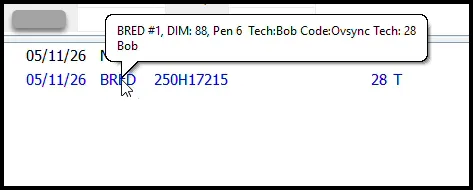
💡TIP: Hover the cursor over the BRED event to see:
- The breeding number.
- Days in milk (DIM) at breeding.
- Pen number (location) at the time of breeding.
- Technician name and number.
- The breeding code and description.
 Click here to continue with the next guide: Semen Inventory