Semen Inventory
🎓In This Guide, You Will Learn:
- How to add or subtract semen straws.
- How to delete a bull.
- How to display/print the semen inventory report.
- Semen Inventory Setup.
- How to enter Bull Information and Update Sire File Links.
- How to assign a tank.
- How to use Semen Inventory with DC Clients.
- How to add sires from semen inventory to the Sires Quick Pick list.
 Enter SEMINV on the command line to begin. DairyComp will display a message stating Semen Inventory File Initialized the first time SEMINV is entered. Then follow this link to learn about setting up and using semen inventory: Sires and Semen Inventory
⚠️ IMPORTANT: Periodically conduct a semen inventory audit to verify the inventory count as straws may be damaged during prep etc. and will show as available unless manually adjusted.
Assigning a Tank
SemInv Setup helps you customize your SemInv report. In the example below we will add Tank to the report shown above. Tank is a popular report item with farms using multiple semen tanks.
- From the Semen Inventory menu, select option 6: SemInv Setup
- Double click an [Available] location on the left and you will be prompted for a semen table item to add.
- Select Tank, then click OK.
- To remove an item: Double-click on an item then hit [esc].
- When finished, click OK to exit.
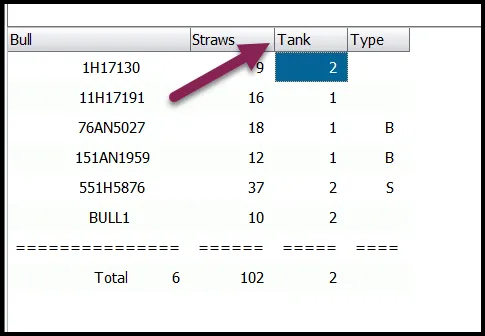
🗒️ NOTE: Tank, or other items, will not be prompted for entry when adding a new sire. See Enter Bull Info below to learn how to add these item values.
SEMINV at DCClient Locations
SEMINV can be used with DC Client also which tracks inventory separately from the DC Server. This is valuable when monitoring semen inventory at different locations.
Call Support for assistance or follow the steps below to setup a DCClient with SEMINV.
- Type SERVER\M on the DCClient command line.
- Click on Enable Client SEMINV
- This creates a local semen inventory file.
- Select Disable to undo.
Breeding Quick Pick List
Add sires from your semen inventory to the Pocket CowCard (PCC) Breeding Quick Pick list to help streamline breeding entries.
- Enter SERVER\3 on the command line.
- Select the PCC Entry tab.
- In the bottom right corner under Pick From, click on Semen Inv. List.
- Click on the sire to add it from the list. You should now see the sire added to the Breeding Quick Pick Sire List.
- Right click on a sire to remove it from the Breeding Quick Pick Sire List.
- Refresh Pocket CowCard to add the changes to your device.
Quick Pick sires are available when a user is prompted for the semen choice when:
- Entering an individual BRED event.
- When using the Breeding Grid Batch option.
Click here to continue with the next guide: Future Inventory (ECON\IR)