Parlor Reports
You can use the PARLOR command to generate a report that summarizes your daily milk activity.
NOTE: You can only generate parlor reports for current milkings in DairyComp, not for previous ones.
Expand the topics below to learn more about Parlor reports.
At the end of each milking, a Parlor report can be generated by entering PARLOR\WM1 in the command line. In the following example, we're requesting the Parlor WM report, where \W represents the parlor report with the wrong pen cows and \M represents the milking number.
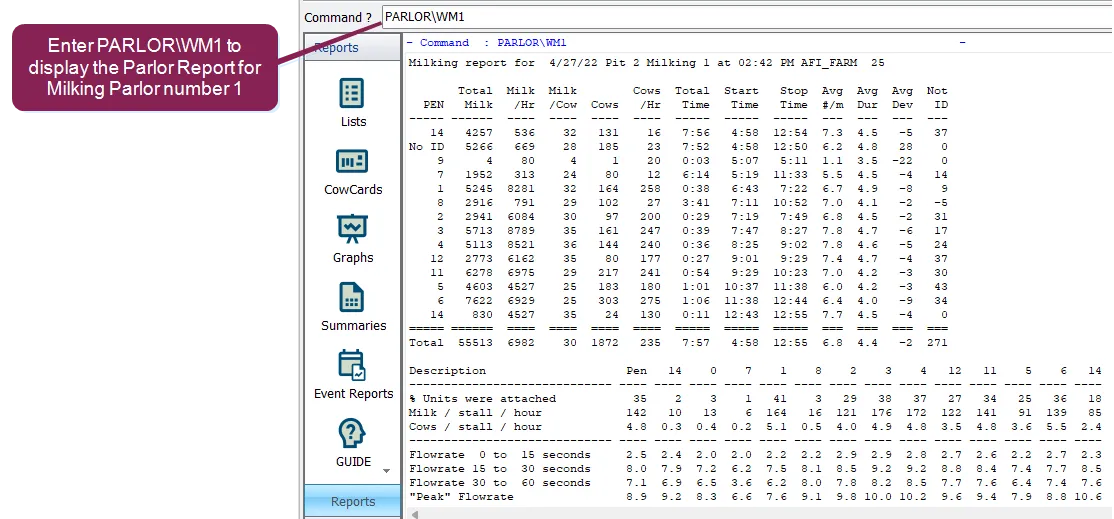
If your dairy has multiple milking cycles, use WM followed by the milking cycle number in the PARLOR command (PARLOR\WM2 for 2nd milking, PARLOR\WM3 for 3rd milking, etc.).
Use the \Y switch to print the report or the \N switch to not print.
NOTE: If you have more than one parlor that is connected to DairyComp, you may need to add the PIT number along with other possible switches in order to retrieve the correct Parlor report.
The above report is a summary of one milking. The top portion organizes the milking data by pen.
IMPORTANT: This data is sorted by “parlor pen”, that is the pen the cows appear to be in according to their movement through the parlor. This is opposed to the pen they are in DairyComp as often times cows are in the wrong pens.
Other report columns include Pen, Total Milk, Milk/Hr, Milk/Cow, Cows (total), Cows/Hr, Total Time, Start Time, Stop Time, Average Pounds of Milk per Min., and Average Milking Duration. The Cows column is better described as a count of the total.
Expand the topics below to learn more about each section of the Parlor report.
Similar to the Parlor Report, DairyComp offers a Milk Load report that is generated by using the MILK command. The Milk Load Report is made according to the pen number contained in DairyComp. The milking times for each pen will seem longer than expected and the cows per hour will be low if the cows are mixed up. The end of the report lists milking errors and provides error details specific to a milking.
The "Milking Errors" list is limited to 64 errors. If there are more than 64, you can search for errors using the .err file extension. This file is called by the manufacturer of the meters. For example, BOUMATIC.err is from a Boumatic system, SURGE.err is from a Surge system, and AFIKIM.err is from Afikim.
The error messages vary with each manufacturer. For those who provide time-of-day of activity, these are labeled as such. ATOD is attached time-of-day; ITOD is identification time-of-day.
The Meter Performance section of the Parlor report is displayed below the Milking Summary. This section provides a summary of the overall milking and breaks the information down by pen. The top three lines display a summary that comes from all meters. The system also displays where milk production is too low, the barn is running inefficiently, milking time is too long because the machines are staying on the cows too long. This will vary greatly with different parlor types. Herringbones and parallel parlors will typically have numbers in the 25 to 40 percent range. Side openers will have numbers in the 60 to 70 percent range. Rotaries are similar to parallels, but have more variation.
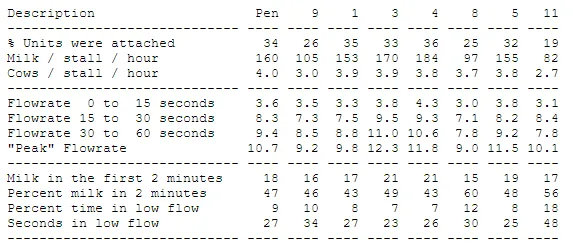
Flowrate data is displayed in the middle four lines. The bottom four lines describe meter performance as a percentage of time.
IMPORTANT: Comparisons are best done day to day within a dairy and sometimes between dairies that have the same equipment.
Comparisons of dairies that have different equipment needs to be done very carefully and with a lot of understanding of functional differences between different meters. For example, with Boumatic equipment, the duration is calculated from when the milker pushed the attach button to when the milking machine was removed from the cow. On the other hand, with Westfalia equipment, duration is the time between the first dump of milk recorded by the meter to the time of the last dump.
The Errors Summary section of the report describes typical errors that are listed with each parlor report. Errors include Reattach, Early Falloff, and Late Rehang events.
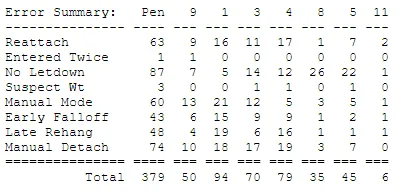
The table displays typical errors that are listed with each parlor report. A unit that is reattached can occur either very early (Early Falloff – less than 25% of the yield), or very late (Late Rehang – less than 3 pounds of milk left), or just Reattach (all other rehangs).
No Letdown is listed only for meters that provide interval flow rates, and occurs when the flow rate in the following interval has decreased. Suspect weight is for milk weights that are far from expected.
The Meter or Stall summary is displayed below the Parlor Errors section of the report. The Stall summary lists all meters that have a milking parameter out of tolerance.
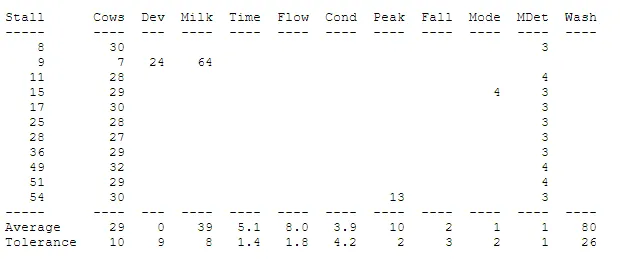
The parameters are listed at the top and vary with each meter manufacturer. Most have the first eight parameters and some have the last two. The averages next to the bottom of the table are the averages for all of the meters for the current milking. The tolerance is what has been determined to be within a normal statistical variation from the average above.
In the example above, the average was 29 per stall and the tolerance from the variations found during this milking were determined to be ±10. This means that any stall that milked more than 39 or less than 19 cows is flagged. This stall averaged 24 pounds more than the expected amount of milk and averaged 64 pounds of milk. This is an indication that something may not be right with stall 9. Stall 54 averaged 13 pounds per minute of peak flow for this milking. The tolerance is 10 ± 2 or 8 – 12. Typically, variations this close to the cut off should be monitored and investigated if they persist for more than one or two milkings.
The Meter summary includes the following parameters:
Parameter | Description |
|---|---|
Cows | Number of cows per stall |
Dev | Deviation from expected milk |
Milk | Average milk per stall |
Time | Average milking duration in minutes |
Flow | Average milk flow per minute |
Cond | Average conductivity reading |
Peak | Average peak flow rate |
Fall | Average number of machine fall offs |
Temp | Average milk temperature |
Mode | Meters set to manual mode |
MDet | Number of times the stall was put into manual detach mode |
Wash | Number of times the meter filled up and dumped during the wash cycle |
A Rotary Parlor table is generated when a rotary parlor is detected. The example below describes a 60-stall rotary that is set to turn one stall every 13 seconds.

For this example, the fastest stalls turned at 14 minutes after midnight. The average was one turn every 13.26 seconds, which includes all the stops that the platter made. Effective is calculated by dividing the total milking time by the total cows milked. Efficiency is the Effective rate compared to the fastest rate. Stops > X seconds is determined by a SETUP parameter STOP setting. To configure this parameter, navigate to SETUP > Parameters > Add Parameter and enter the desired value. The most common setting is two times the seconds per stall turn rate. In this example, the value is set to 25.
The \W switch generates a list of cows in the wrong pen. Enter PARLOR\M1W in the command line to add cows in the wrong pen to the bottom of the Parlor report. The addition is displayed below.
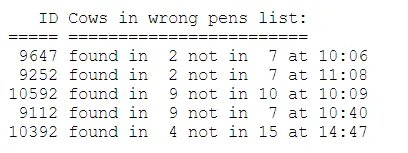
The list is determined by DairyComp estimating when a group of cows change in the parlor. In the case of a herringbone, when an entire side of cows are in Pen 6 except one from Pen 5 (PEN in DairyComp), then that cow is likely in the wrong pen. If cows are milked together in a side from two different pens, DairyComp has difficulty determining the correct pen.
In a rotary, it is assumed that all cows from one pen are finished before the next one starts. If the last three cows in the pen are interspersed with the first five of the next pen, DairyComp cannot determine which of these animals are in the wrong pen.
In some instances, only a list of the cows in the wrong pen is required without the other parlor information. In this case, a \Q switch can be added to the PARLOR command after the \W switch, like PARLOR\M1WQ.
When the PARLOR command is run with no switches, you will be asked to select which milking to examine. DairyComp stores the last 24 hours of milkings, whether there are 2, 3, or 4 sessions throughout the day. The example below describes milking session number 2.
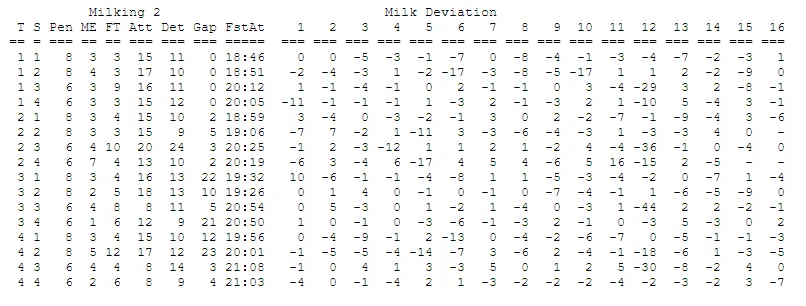
At the bottom of this report is an explanation of the abbreviations used. The parlor used in this example consists of two double-16 parallel pits:
- T - Turn
- S - Side
Turn (T) is the number of times a side has filled up. Side (S)represents each side of the pit. In this case there are 4 sides each with 16 stalls. This means that if you want to look at stall 53, you’d go to stall number 5 on side 4 for each turn to see each milking in that stall.
- MY - Average milk yield
MY is available on each report as the default, with the exception of deviation. In the example above, ME represents "Mean Error". If you have a +2 and a -2, the average is 0 since deviation can be either a positive (+) or a negative (-). However, that is considerably different than no deviation from any stall. Therefore, for this figure, the signs are first removed from the number and then they are averaged. In all other reports, MY will display.
Additional figures include:
- FT - Seconds per cow to fill the side
- FstAT - First cow attached
- Att - Average seconds to attach
- Det - FstAt to LstDt
- Gap - Prior LstDt to FstAt
- Dev - Milk deviation in pounds
Fill time (FT) is the average in seconds for the cows to fill the parlor. It is actually the time from the first ID to the last ID that occurs when filling a parlor. This is used for archway identification equipment and not for individual stall identification.
First Attached (FstAt) is the time of day the first machine was hung on a side. Attached Average (Att) is the average seconds between attachment for each cow in a side. Detach (Det) is the average number of minutes between the time of first attachment to last detachment. Gap is the average minutes between the last detachment to the first attachment of the next side. Notice in the example shown above that for sides 2 and 1, turn in 4 and 5, there is a 24-minute gap. This also happens to be when the loan milker in this pit also needs to go get cows.
Deviation (Dev) is the numeric average (the number without a "+" or "-" sign) of all the deviations.
When a report this large is generated, pressing the ESC key displays the following menu selections:
- Time of Attachment
- Order
- Entry
- Delay
- ID
- Pen
- Deviation
- Duration
- Hold Up
- Milk
- Flows
- Peak
- Reattach
- Conductivity
- Summary Only
You can select any of the parameters listed to view information about the milking being examined. Selecting F, Summary only will display a stall summary of each parameter as described below.
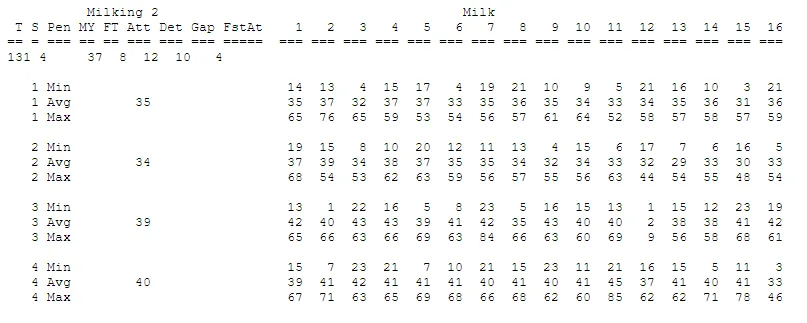
The above data is broken down by side where the minimum, maximum, and average are shown for each stall.
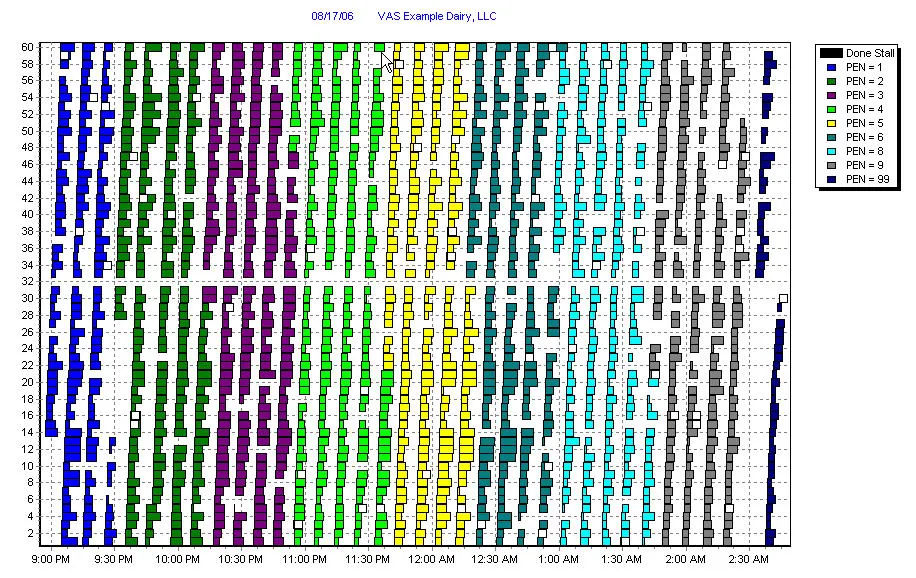
Graphs of the milking for the latest generated Parlor report can be viewed by clicking the Graph tab at the bottom of the screen.
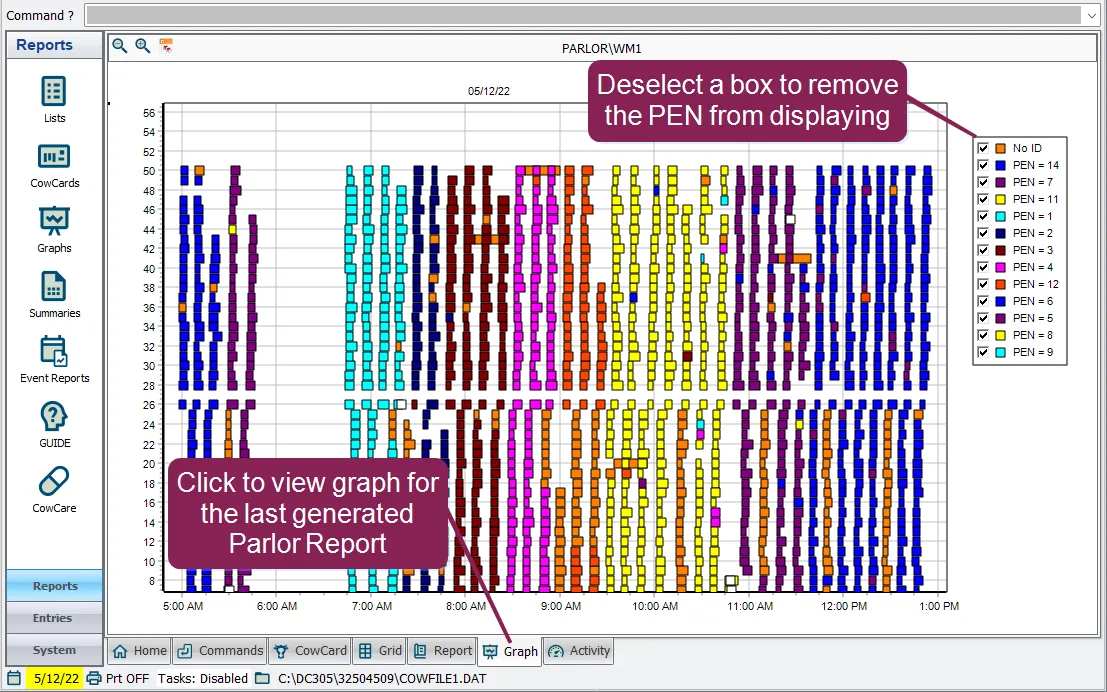
To zoom in on particular times and/or stalls, click and hold the left mouse button and create a box by dragging left to right around the data you want to see. Click and hold right to left to zoom out. Zooming in and out allows you to view more about order or attachment and helps you visually see reattachments, milking durations, and missed stalls. Click on a colored box in the legend to remove it from displaying on the graph.
The example shown below is a graph of the Parlor Report from a 60-cow rotary. Time is shown on the X-axis and the milking stalls are shown on the Y-axis. Each colored box represents a cow and the color is the pen that the cow should be in according to DairyComp. The size of the colored box equates to unit on-time. The longer the box, the longer the unit was attached to the cow. Hover over a colored box to see more information, like ID, milk weight, deviation, and attach time. Reattachments are displayed as white squares. It is easy to see on this graph that stall 32 is not working properly. Stall 32 recorded no milk weights during the entire shift. The legend in the upper right corner defines what pen each color represents. The "Done Stall" is a tool that helps dairymen size their parlors correctly, and represents the number of stalls that passed by the entrance gate from unit attachment to unit detachment. View the Done Stall by clicking on it in the legend.
Each milk load builds the DairyCompPPn.dat file, where “n” is the milking number. The file contain details of the each cow milked in each stall and for the milking. At the same time as this is done, the herdcode.par file is updated with the summary data for each side of each milking. The .par file is actually an ASCII file that can be viewed using the Parlor Graph program (PG305.exe). The DairyCompPPn.dat files are re-written each day and the previous milking is saved to DairyCompPPn.bak.
The most commonly used Parlor report switches, along with their function are listed in the table below:
Switch | Function |
|---|---|
\B | Bundle error report if present |
\E | Error codes |
\F | Full detail |
\G | Default to Graph, not report |
\In | Info for Pit n |
\Mn | Milking number (n) |
\N | Do not print report |
\O | Overview (runs PG305) |
\R | Rotary parlor |
\W | Report with wrong pen cows |
\WQ | No report, only wrong pen cows |
\X | Graph duration vs. latest milk |
\Y | Print report |
NOTE: FOR can be used to include only specific pens or stalls in the report. For rotary parlors only, PARLOR will store the Done Stall to that item, which is usually a type 1 item like COD1.