Introduction to BREDSUM
3 min
🎓In This Guide, You Will Learn:
- How to run a BREDSUM report
- How to read a BREDSUM report.
- The common switches used with BREDSUM.
- BREDSUM command syntax.
- Cross-Table Analysis.
BREDSUM is a command verb and offers numerous options for analysis, such as:
- By Technician
- By SIRE
- By Stude Code
- By Breeding code
The graph below is an example graph for BREDSUM by Week of Conception
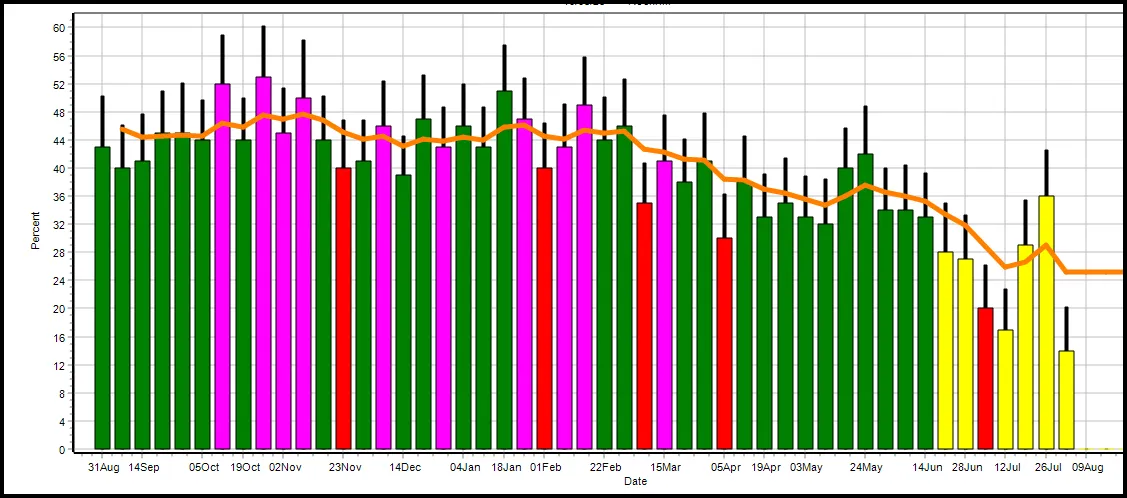
- BREDSUM\R: The R switch displays a graph of conception rates over time.
- Green Bars: Normal conception rates.
- Red Bars: Early warning of conception problems due to a higher percentage of cows being rebred at 21 days since last heat.
- Yellow Bars: >10% unknown outcomes:
- Animals not yet bred again and not checked for a pregnancy.
- Animals marked as sold or died before a pregnancy check or being rebred.
- Purple Bars: >10% of breedings occurred within in 2 days of prior breeding (repeat breedings).
 Click here to begin learning about: BREDSUM Reports
Cross Table Analysis
Cross table analysis is a power feature with BREDSUM that allows a user to compare two variables together in one report. The X switch is used with BREDSUM along with two other switches. Below are some common cross table BREDSUM commands.
- Stud Code by Service Number: BREDSUM\XMB
- X is for cross table
- M is for stud code
- B is for service number
- Service Number by Sire: BREDSUM\XBS
- B is for service number
- S is for sire
- Calendar Month by Technician: BREDSUM\XCT
- C is for calendar Month
- T is for technician
- Sire by Breeding Code: BREDSUM\XSO
- S is for sire
- O is for breeding code
Click here to continue with the next guide: GUIDE for Reproduction