CowCare Documents
1 min
The Documents screen allows you to store all your dairy’s VCPR (Veterinarian Client-Patient Relationship) documentation in one location. You can also set a VCPR Expiration Date that will notify users when the documentation needs to be updated. Click the Documents tab to open the CowCare Documents screen.
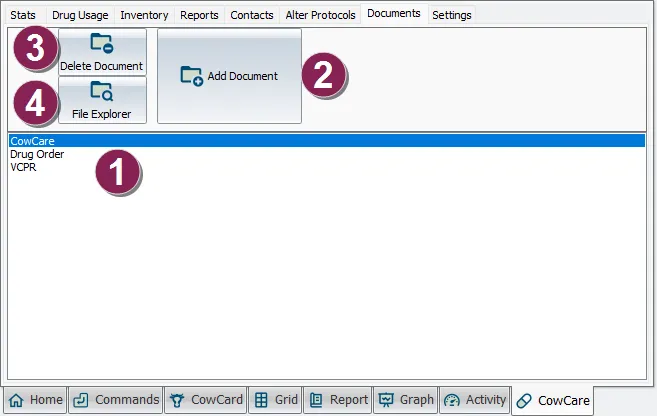
- Documents list: Double-click to open and view a document.
- Add Document: Click to open a File Explorer window and select a document to upload to CowCare.
- Delete Document: With a document selected from the Documents List, click Delete Document to remove the file from CowCare.
- File Explorer: Click to open a File Explorer window that contains all of your CowCare documents. (X:\DairyComp\CowCare)
The Veterinarian Name, Email, and Phone fields are optional, but if the Email is included, then when any changes are made to protocols in ALTER\7, an automatic notification will be sent to the Vet, informing them what is occurring at the facility.
NOTE: This topic is based on the latest version of CowCare. Existing DairyComp customers can enable the new CowCare by going to SETUP > Preferences and clicking the Turn on New CowCare button.