Breeding Entry using VAS PULSE Platform
🎓In This Guide, You Will Learn:
- How to enter a single breeding.
- How to enter breeding in bulk.
- How data entered is synced with DairyComp.
VAS PULSE Platform is the web-based interface for DairyComp. It allows breeding entries from any device with a browser and automatically syncs data with DairyComp.
⚠️ IMPORTANT: A user must have Herd Write permissions in VAS PULSE Platform for data entry. Click here for more information: Edit Dairy User Permissions
Enter a Single Bred Event
- Login to VAS PULSE Platform.
- Enter the cow ID in the search bar located at the top of the screen.
- Click on
 located in the top right corner.
- Click on the search bar and click on BRED.
- Click on each of the four boxes to enter:
- EDAY (date of breeding)
- Breeding Code
- Technician
- LSIR (the sire used for breeding)
- Click on SAVE to send the BRED event to DairyComp.
 To learn more about the following topics, click Events then select "Add Events":
- Required user permissions
- Adding a single event
- Adding an event with unique details to multiple animals
- Adding an event with identical details to multiple animals
Add Events in Bulk
The BRED event can be added in "bulk" which greatly streamlines data entry.
- Login to VAS PULSE Platform.
- Select the DairyComp tab.
- Select Animals.
- Select Add Event in Bulk.
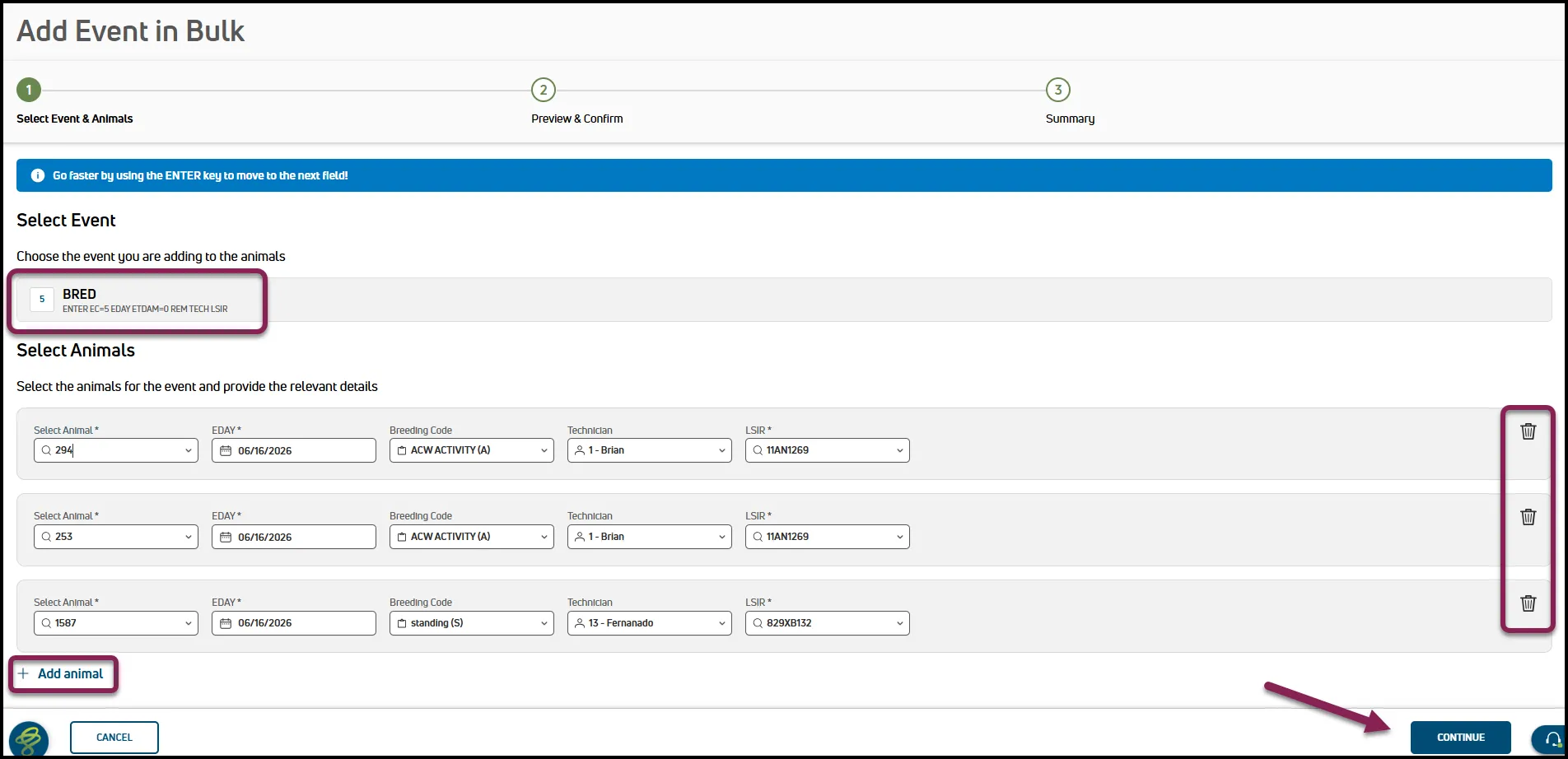
- Under Select Event, select the BRED event.
- Enter the first animals and the required breeding information.
- Click on Add animal.
- Enter the second animal and the previous entry data will automatically populate.
- Adjust any breeding data if needed or click on the trash can to delete an entry.
- When finished, click on Continue in the bottom right corner.
- Review the data entered.
- Unselect any that should not be sent to DairyComp.
- When finished, click on Add Event to # Animals in the bottom right corner. This will send the BRED event to DairyComp.
💡TIP: To verify entries, go to the Dairy tab and select Change Log. This shows a history of all data changes, similar to the activity log in DairyComp.
Sending Entries to DairyComp
VAS PULSE Platform will automatically send any entries to DairyComp. The BRED event will display in VAS PULSE Platform after DairyComp receives the BRED event and sends new entries back to VAS PULSE Platform.
Follow this link to continue with the next guide: Breeding Entry using DC on Mobile