Consigli per la Pianificazione Genetica
Per accedere e utilizzare GENEX DairySuite, devi prima essere aggiunto dal tuo amministratore o manager e assegnato a specifiche aziende lattiero-casearie. Vedi Gestione GENEXGestione GENEX per saperne di più sull'accesso degli utenti.
IMPORTANTE: Non utilizzare il pulsante Richiedi Accesso  nella pagina del profilo dell'azienda lattiero-casearia per richiedere l'accesso allo strumento di pianificazione genetica. Questa opzione invia un messaggio al proprietario dell'azienda lattiero-casearia e potrebbe causare confusione.
Quando apri la pagina dei Piani Genetici, ci sono alcune cose che noterai:
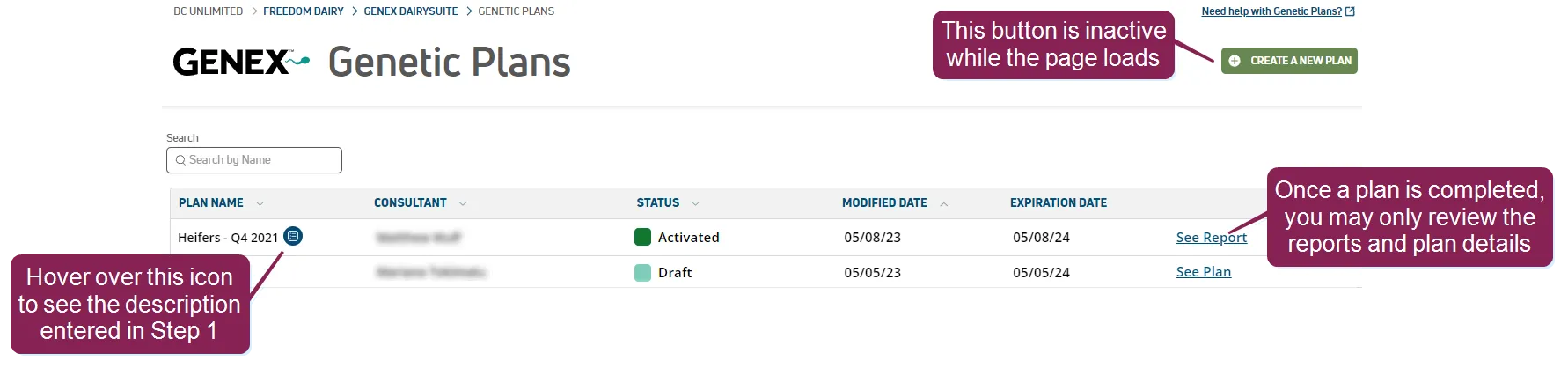
- Il Crea un Nuovo Piano il pulsante non può essere cliccato; questo è solo temporaneo mentre PULSE carica i dati in background. Quando la pagina è completamente caricata, il pulsante diventa attivo.
- La tabella elenca ogni piano genetico che è stato creato, e la colonna Stato ti indica lo stato attuale del piano. Lo stato di un piano attivo può essere definito come uno dei seguenti:
- Bozza: Hai iniziato i passaggi di pianificazione genetica, ma non li hai completati.
- Pronto per l'attivazione: Hai completato i passaggi di pianificazione genetica, ma non hai ancora attivato il piano.
- Attivato: Hai completato i passaggi di pianificazione genetica e hai attivato il piano. Inoltre, lo stato di un piano inattivo può essere definito come Scaduto a seconda delle circostanze di inattività del piano.
- Quando un piano è Attivato, tutti i Passi nel piano diventano di sola lettura e non possono essere modificati. Il Vedi Piano l'opzione cambia in Vedi Rapporto per riflettere questo cambiamento.
- Puoi clonare un nuovo piano basato su un piano precedente. Il nuovo piano includerà tutte le tue impostazioni dal piano esistente.
Basta fare clic sul piano che desideri copiare per visualizzarne i dettagli in un pannello laterale, selezionare il pulsante Opzioni
 nell'angolo in alto a destra, e selezionare Duplica Piano.
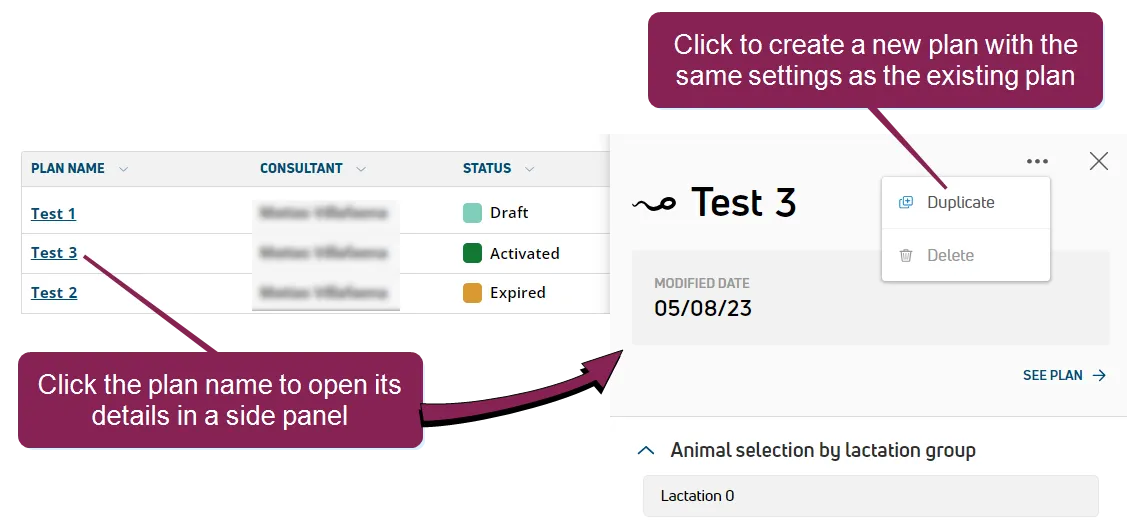
NOTA: Puoi duplicare un piano esistente solo se hai completato tutti i suoi passaggi di pianificazione genetica.
- Se è stata inserita una descrizione in Passo 1: Dai un Nome al Tuo Piano Passo 1: Dai un Nome al Tuo Piano di un piano esistente, un blu Nota icona
 appare accanto al nome del piano. Passando il cursore sopra l'icona viene visualizzato il testo della descrizione.
Il rapporto sulla integrità dei dati è uno strumento utile per migliorare l'accuratezza del piano. Per identificare rapidamente i dati sugli animali mancanti o incompleti, scarica il Data Integrity ReportGENEX DairySuite Genetic DashboardThe GENEX DairySuite Genetic Dashboard includes a variety of widgets that provide overview and genetic assessment details to help you analyze the genetic makeup of the herd. Click GENEX DairySuite > Overview from the main menu bar to access the dashboard.Expand the sections below to learn more:Data Integrity ReportDownload the Data Integrity report to quickly identify missing or incomplete animal data. You can then consult the dairy to add more information or resolve data errors in PULSE or DC305. When you improve the integrity of the herd data, GENEX DairySuiteGENEX DairySuite assessments and genetic plans become more accurate and provide more value to the dairy. Inaccurate herd data could result in matches that don't provide the best possible value or the loss of healthy, valuable animals.You can download the report by clicking the button at the upper right corner of the page.The report denotes missing animal information with one of the following values: a blank space, No Match in Proofs, or UNKNOWN.Click here to see the information included in the report!Female Identification (ID): Female's Platform cow numberFemale ISO ID: Female's ISO identifierFemale Electronic ID: Female's electronic identifierFemale has a duplicated ISO ID: If the value is YES, GENEX DairySuite found a duplicate ISO identifier for the female. You will be prompted to download a list of duplicate identifiers that the dairy needs to resolve before the female can be included in a genetic plan.Female Registration Number: The value that GENEX DairySuite tried to match to female proofs. If the value is displayed, it does not necessarily mean that a match was found.Genomic flag (YES/NO)If the value is YES, GENEX DairySuite found genomic data in female proofs that matches genomic data that the dairy provided.If the value is NO, then the animal is not proven or the dairy did not provide a sufficient identifier for the animal.Female Breed (as interpreted by UDS): The female's breed, as interpreted and supported by GENEX DairySuiteFemale Breed (as it is in Platform): The female's breed, as it was entered into Platform by the dairyBirthdate: Female's birth dateAge (in months): Female's age Sire ID: Sire's Platform cow numberSire ISO ID: Sire's ISO identifierSire IntRegNumber: Sire's international registration numberMaternal grandsire ID: Maternal grandsire's Platform cow numberMaternal grandsire ISO ID: Maternal grandsire's ISO identifierMaternal grandsire IntRegNum: Maternal grandsire's international registration numberMaternal great-grandsire ID: Maternal great-grandsire's Platform cow numberMaternal great-grandsire ISO ID: Maternal great-grandsire's ISO identifierMaternal great-grandsire IntRegNum: Maternal great-grandsire's international registration numberSire of conception ID: Sire of conception's identifierSire of conception ISO ID: Sire of conception's ISO identifierSire of conception IntRegNum: Sire of conception's international registration numberBreed of sire of conception (as it is in PULSE): Sire of conception's breed as it's shown in PULSEBreed of sire of conception (as interpreted by UDS): Sire of conception's breed as it's been interpreted by GENEX DairySuiteSemen type of SIRC: The semen type of the sire of conception, which can be one of the following: Sexed Male, Sexed Female, Conventional or BeefPrevious lactation sire of conception ID: Previous lactation's sire of conception's identifierPrevious lactation sire of conception ISO ID: Previous lactation's sire of conception's ISO identifierPrevious lactation sire of conception IntRegNum: Previous lactation's sire of conception's international registration numberLast calving date: Female's last calving dateLactation number: Female's lactation numberReproduction code: Female's reproduction code0: Heifer1: Do Not Breed2: Fresh3: OK/Open4: Bred5: Pregnant6: Dry7: Sold/Died8: BullcalfTo learn more about reproduction codes, see Reproductive Codes in the DairyComp 305 online help.Breed of sire: Sire's breedBreed of Maternal grandsire: Maternal grandsire's breedBreed of Maternal great-grandsire: Maternal great-grandsire's breedBreed of sire of conception: Indicates whether the sire of conception's breed is supported or recognized by the genetic planning toolBreed of previous lactation sire of conception: Indicates whether the previous lactation's sire of conception's breed is supported or recognized by the genetic planning toolFemale pedigree: Sire name X maternal grandsire's name X maternal great-grandsire's nameHerd AssessmentReview the Herd Assessment for animal counts, estimated replacement heifer data, and conception rates. Hover over the symbol to see when PULSE last sent updated widget data to GENEXDairySuite.Health EventsReview the Health Events for diagnosis counts and to note any trends or prevalent illnesses for the herd.Genetic Averages by CompanySee the topics below to review genetic traits by semen supplier.Select the Breeds you want to view.Select the Trait you want to analyze.Select the Companies you want to compare. Based on your settings, the bar graph compares the trait across all suppliers for six standard animals groups.Hover over a group for trait value details by company.See when the data was last updated.Click Show More Info to view all trait details by company in a table format.Hover over trait abbreviations to view their full name, or click the column header to sort the data by that trait.NOTE: This widget is unique in how it calculates trait values: only bulls' traits are included in the average values. The other widgets on the Dashboard include both parents' averages for genetic trait values. Productive LifeUse this widget to analyze productive life and health event/diagnosis data.Select the Event, animal Group, Breeds, and Division. How are Divisions determined? Trait values are analyzed for all animals and median values are used to divide the animals into divisions. You can choose to divide the animals into halves, thirds, or quarters.Hover over a division for event details.Click Show More Info to view all event details in a table format.Hover over event abbreviations to view their full name, or click the column header to sort the data by that event.Herd Genetic OverviewUse this widget to assess 12 key genetic traits for the herd.Genetic average for the trait. This value is based on each animal's genomic trait value, if available, or the trait value calculated based on the animal's sire, dam, maternal grandsire, and maternal great-grandsire.Total number of animals in the herd, including unborn calves (pregnancies).Click the expand icon to view the trait values by animal group.Total values by trait.Average Index by Age GroupUse this widget to view the average index values for each age group.Select the Index type you want to view. These indexes match those available in Step 2: Set Breeding Goals & Index.Select the Breed you want to see.The age groups are listed from oldest to youngest.Click the expand icon to view the average index values by age group.Milk 305 MEUse this widget to analyze 305 day mature equivalent milk production (305ME) for the herd.Select the animal Group, Breeds, and Division. How are Divisions determined? Trait values are analyzed for all animals and median values are used to divide the animals into divisions. You can choose to divide the animals into halves, thirds, or quarters.Hover over a division for 305ME details.Click Show More Info to view all 305ME details by division in a table format.Daughter StillbirthUse this widget to analyze daughter stillbirth data.Select the animal Group, Breeds, and Division. How are Divisions determined? Trait values are analyzed for all animals and median values are used to divide the animals into divisions. You can choose to divide the animals into halves, thirds, or quarters.Hover over a division for daughter stillbirth details.Click Show More Info to view daughter stillbirth data by division in a table format.Sire StillbirthUse this widget to analyze sire stillbirth data.Select the animal Group, Breeds, and Division. How are Divisions determined? Trait values are analyzed for all animals and median values are used to divide the animals into divisions. You can choose to divide the animals into halves, thirds, or quarters.Hover over a division for sire stillbirth details.Click Show More Info to view sire stillbirth data by division in a table format.Heifer InventoryUse this widget to view all live heifers grouped by birth year and reproduction status. Open the Heifer Inventory tab to view this report.Use the filters to manage the heifers you see in the graph. Enter a value for Heifers Needed Monthly to show a threshold line in the graph.Hover over any data point to see exact values.Click Show More Info to view the heifer inventory data in a table format.Future CalvingUse this widget to view all future, unborn heifers grouped by due date. Open the Heifer Inventory tab to view this report.Use the filters to manage the animals that you see in the graph. You can choose to show cows, heifers, or both.Enter a value for Heifers Needed Monthly to show a threshold line in the graph.The genetic planning tool uses these percentages to calculate how many future calves will be female. We recommend that you use the default values: 90% for Female Likelihood for Sexed and 49% for Female Likelihood for Conventional.Hover over any data point to see exact values.Click Show More Info to view the future calving data in a table format.< Return to GENEX DairySuite HOME dal Cruscotto Genetico. Per l'analisi del bestiame più accurata e completa, chiedi al caseificio di aggiungere i dettagli di parentela per gli animali nel tuo allevamento. VAS raccomanda di aggiungere i dati per tutti gli animali per i seguenti elementi standard PULSE/DairyComp 305:
- Toro (SID)
- Madre (DID)
- Nonno materno (MGS)
- Bisnonno materno (MGGS)
Questi dati vengono utilizzati per valutare il profilo genomico del gregge e sono alla base dei calcoli effettuati per specifiche caratteristiche animali e potenziali miglioramenti.
La media della razza è anche incorporata nei calcoli di valutazione, ma avere dati specifici sulla parentela degli animali nel gregge aumenta notevolmente l'accuratezza del processo di analisi:
- Media dei genitori a tre generazioni: Se una prova non è disponibile per una femmina, i dati sui tratti vengono utilizzati dalle tre generazioni precedenti di padri (padre, nonno materno e bisnonno materno) per calcolare le medie dei tratti della femmina. GENEX DairySuite calcola i valori dei tratti utilizzando percentuali ponderate delle medie dei genitori a tre generazioni e della media della razza:
- 50% padre
- 25% nonno materno
- 12,5% bisnonno materno
- media di razza del 12,5%
- Media dei genitori di una generazione: Per calcolare le medie dei tratti di una potenziale progenie, vengono utilizzati i dati sui tratti dei genitori della progenie (padre e madre).
- Media della razza: Quando i dati dei genitori non sono disponibili, le medie dei tratti di una progenie si basano sulla media della razza.
NOTA: Solo il caseificio sarà in grado di configurare gli articoli e aggiungere dati per gli animali nel gregge, poiché i consulenti genetici hanno accesso in sola lettura ai dati sugli animali in PULSE.
Sulla base delle discussioni con il caseificio, raccoglierai gli obiettivi principali del proprietario, inclusi quali delle categorie di tratti generali devono essere al centro del piano. Nella Fase 3 dello strumento di pianificazione genetica, inizia selezionando un valore preset per impostare le percentuali delle categorie principali per Produzione, Salute e Conformazione, e poi regola i valori per tratti specifici in quelle categorie.
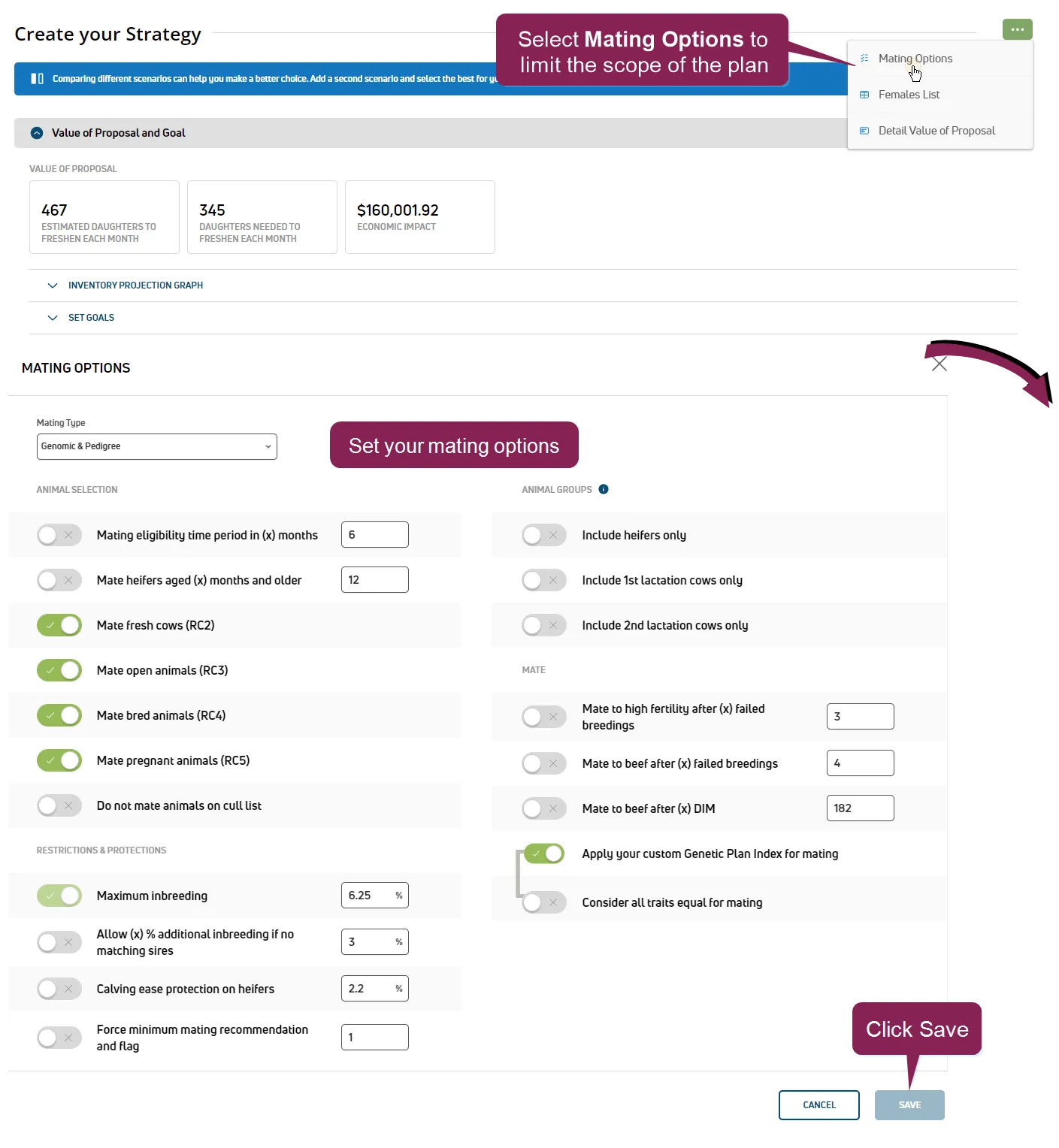
PULSE mantiene l'ultimo piano genetico come il piano "attuale". Tuttavia, puoi creare piani che si applicano a specifici raggruppamenti di animali o ad altri criteri durante la definizione del piano. Usa le opzioni in Passo 4: Crea la tua strategiaPasso 4: Crea la tua strategia per concentrare il tuo piano su animali specifici o per limitare l'ambito dei piani individuali.
GENEX DairySuite supporta l'aggiunta manuale di tori al tuo piano genetico. Questo ti consente di selezionare manualmente tori che non sono attualmente inclusi nell'elenco di marketing GENEX, o di utilizzare l'inventario rimanente di un altro fornitore di seme.
Vedi Aggiungi tori al tuo pianoAggiungi tori al tuo piano per saperne di più!