Step 3: Map Genomic Items in PULSE
1 min
Before you can connect the integration in PULSE, you must first map the genomic items you created in Step 1: Create Genomic Items in DC305Step 1: Create Genomic Items in DairyComp to standard items in PULSE:
- In PULSE, navigate to the DairyComp > Settings page and select Item Definitions from the list on the left side.
- Find the user-defined item you created to store genomic sample numbers, then click the item to edit its details in a side panel.
- In the Standard Item field, select the standard item equivalent for your user-defined item. In this instance, select GSAMP for your genomic sample number item.
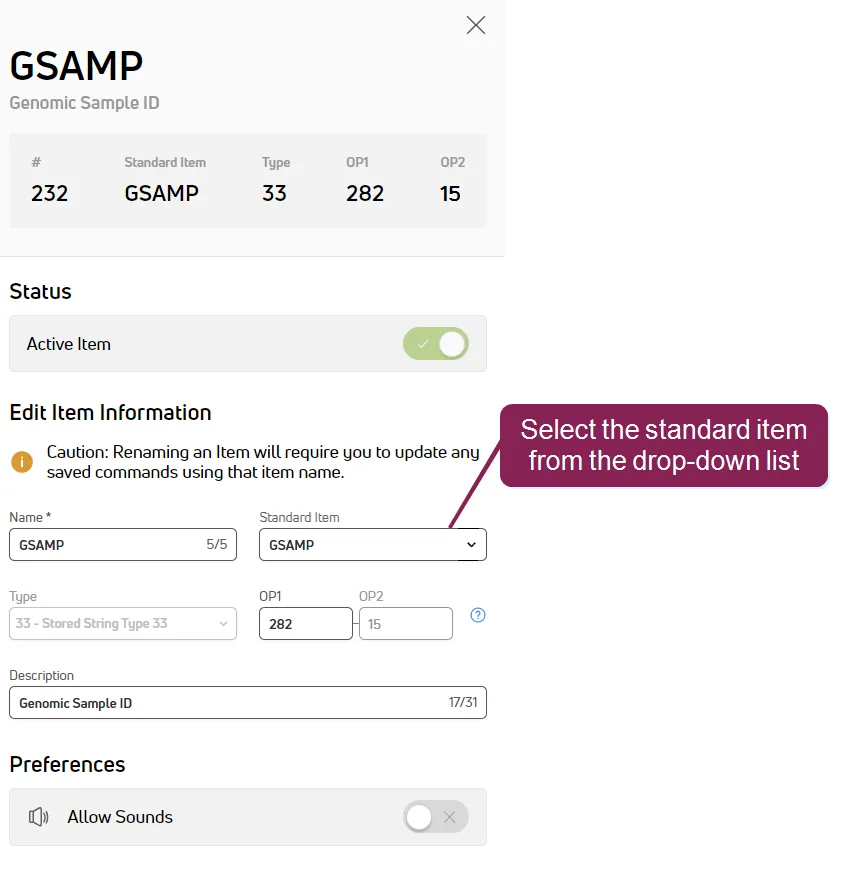
NOTE: The system disables the field if the item is already mapped.
- Click Save.
- Repeat steps 2 – 3 to update the item you created to store genomic sample dates and set it to use the GSDAT standard item.
After you map the items, proceed to Step 4: Connect Integration in PULSEStep 4: Connect Integration in PULSE to connect the integration in PULSE.