Step 1: Create Genomic Items in DairyComp
2 min
Before you can start submitting samples to Zoetis, you must first create the genomic sample items. The system will not display records that do not have a GSAMP (Genomic Sample Number) and a GSDAT (Genomic Sample Date):
- In DairyComp, enter ALTER\2 in the command line to open the Item Definitions list and check to see if you have the required items:
Suggested Name | Type | Length/Op2 | Description |
|---|---|---|---|
GSAMP | 31 or 33 | 15 | Genomic sample ID |
GSDAT | 18 | — | Date sampled |
TWCOD | 33 | 1 | Twin code |
- If the items are not in the Item Definitions list, click Add [Ins] on the left side of the window to create the items.
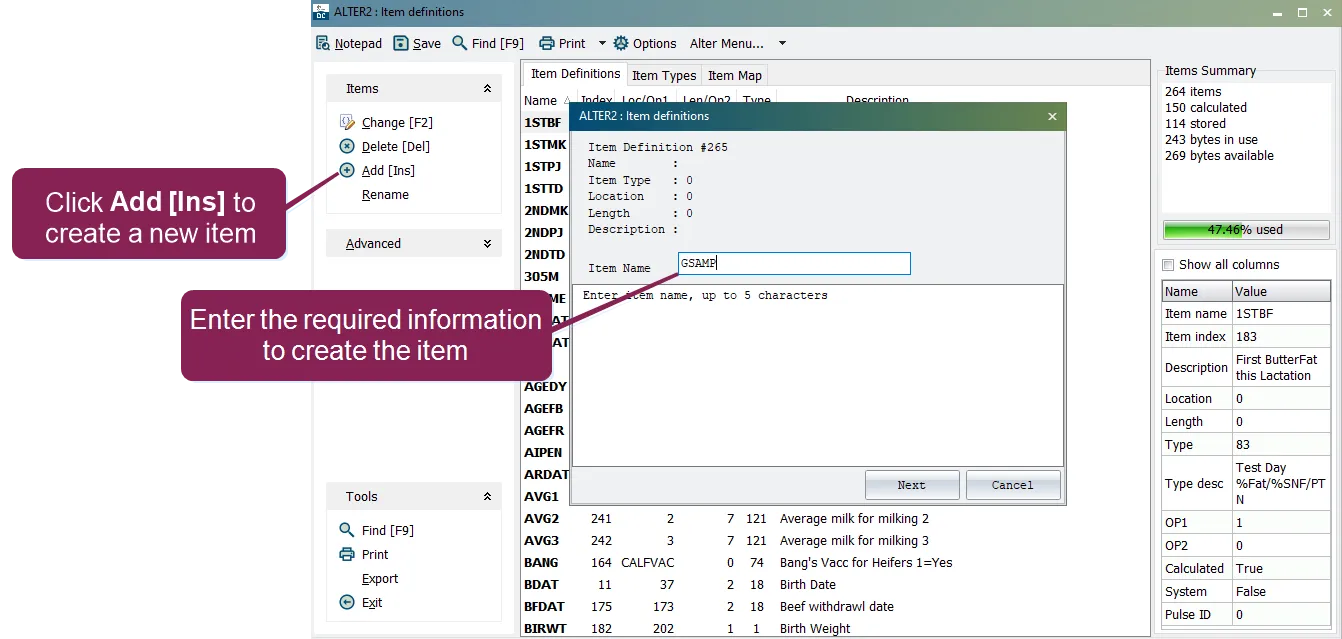
- Use the information in the table to enter the item name, item type, length, and description for each required item.
IMPORTANT: Item names can be customized and may differ from those suggested by VAS. If you choose to customize your item names, be sure to use the correct names later in this procedure.
- Click Save.
After you verify that the required items are in the Item Definitions list, proceed to Step 2: Store PULSE Genomic Items in DC305Step 2: Store PULSE Genomic Items in DairyComp.