Activate CattleEye Integration
Only users who are assigned a Role with Integrations Management permissions can connect partner integrations. See Edit Dairy User PermissionsEdit Dairy User Permissions and Manage Dairy RolesManage Dairy Roles for more information.
Follow these steps to connect the CattleEye integration and view measurement data in PULSE:
- In PULSE, navigate to Partners > Integrations Gallery > CattleEye.
- Click See Details or See Requirements on the CattleEye integration card.
- Follow the Connection Instructions on the right side of the page to establish the connection:
- Click the Connection Status toggle and verify the status switches to Active.
- Click Save.
- If necessary, click Edit Integration to make any adjustments or edits and save your changes.
IMPORTANT: If your integration does not automatically connect, contact your CattleEye representative to connect the integration from their system. If requested, provide your Dairy Id and Herdcode listed on the CattleEye Integration Gallery details page.
IMPORTANT: DC305 version 25.1 is required to support all Measurement ItemsMeasurement Items. See Update DC305 to the Latest Release in the DairyComp 305 online help for update instructions.
- In DairyComp, enter PLATFORM on the command line.
- Click the PULSE Items tab and expand the Activity Measurement Alerts.
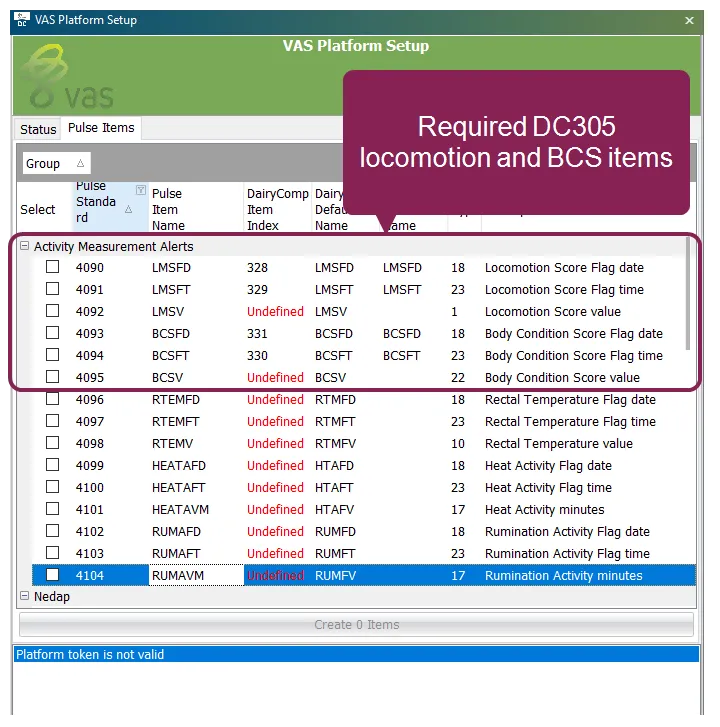
- Verify that locomotion and body condition items exist. Expand Available ItemsAvailable Items to learn more about each item.
Item Description | DC305 Suggested Item/PULSE Standard Item | Item Details |
|---|---|---|
Last BCS date | BCSFD | Date the last BCS was added. |
Last BCS time | BCSFT | Time the last BCS was added. |
Last BCS value | BCSV | Last BCS value. The value indicates an animal's energy balance based on being extremely thin or having excessive fat deposits. Contact CattleEye for more details on how their system scores body condition. |
Previous BCS value | PBCSV | BCS value before the last value (BCSV). The value indicates an animal's energy balance based on being extremely thin or having excessive fat deposits. Contact CattleEye for more details on how their system scores body condition. |
Last locomotion score date | LMSFD | Date the last locomotion score was added. |
Last locomotion score time | LMSFT | Time the last locomotion score was added. |
Last locomotion score value | LMSV | Last locomotion score value to indicate mobility. Contact CattleEye for more details on how their system scores locomotion. |
Previous locomotion score | PLMSV | Locomotion score value before the last value (LMSV). Contact CattleEye for more details on how their system scores locomotion. |
NOTE: Once the measurements system is connected and collecting data, the CowCards' Partners tab will begin to populate measurement data. See CattleEye CowCard WidgetCattleEye CowCard Widget to learn more. See Nedap SmartSight CowCard WidgetNedap SmartSight CowCard Widget to learn more.