Using Sexed Sires
Customers who do not use NAAB codes can use the enhanced Sexed Sire feature in DairyComp to designate a sire as sexed female, sexed male, and sexed and unsexed beef sires.
This primarily helps customers outside of the US, particularly in Europe, where NAAB codes are not available.
In the US and various other countries, NAAB codes are used to designate sexed semen. For example, code 11H123 is an unsexed sire and code 511H123 is the sexed variant. Both codes refer to the same bull, just different semen straw options. This works quite well when designating sorting status for both dairy and beef bulls.
However, not every country uses NAAB codes, for example Germany, Italy, and the UK. So you would need a way to designate any sire as sexed, without relying on NAAB codes. For example, Germany uses DHV codes for sires, where sires are 6-digit numbers like 409123, but there may also be a sexed semen variant of 409123. In this case, there would be no way to know which sire number is sexed, so you can used the sexed sire feature in DairyComp to designate your sires as sexed female, sexed male, and sexed and unsexed beef sires.
NOTE: This feature is mainly for non‑US herds, where NAAB codes are not available. In the US, it is always, highly recommend that you use NAAB codes for sire entries. The short names, ISO tags, breed, etc. are still available, and the short name, breed, stud, and sexed code are automatically populated for any sire defined with a NAAB code. To help clarify the benefit of using NAAB codes, the ability to edit breed and stud codes from the sire edit screen in ALTER\8 has been removed.
See the topics below to learn more about using sexed sires:
The simplest method is to add .S to any sire name to designate it as sexed when entering it into DairyComp. For example 12345 is not sexed and 12345.S is sexed.
The command for the sexed sire would look like this:
ENTER SID=12345.S
With this enabled (which is the default for most of Europe and Canada), BRED will offer a list of the available sires, and they can be selected by entering all or part of the short name.
With sexed sires, you can select an alternate suffix, and a new sire can be added during the ENTER process (as shown in the example command above).
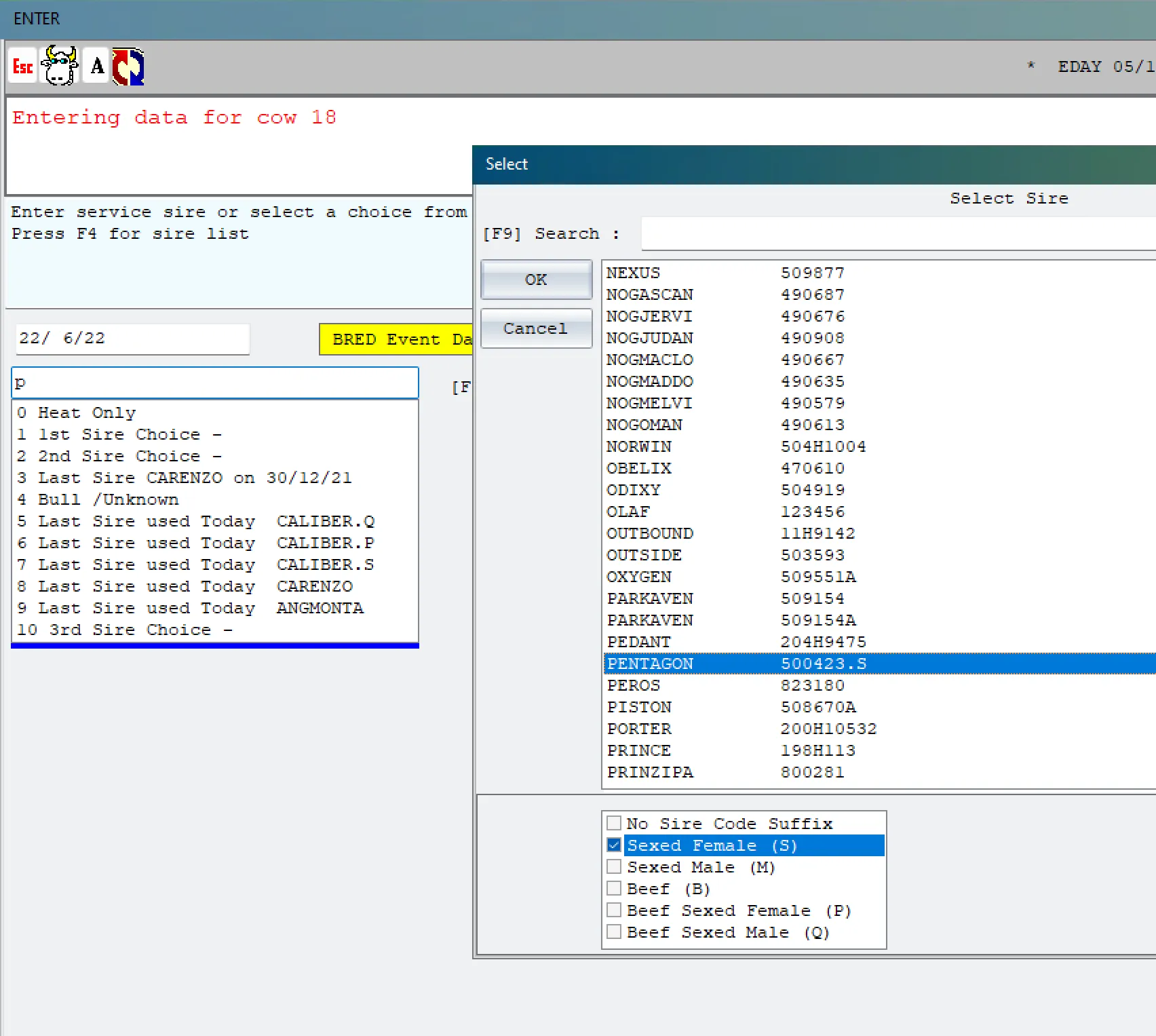
If you enter the sire NEXUS, that is DHV code 509877, you can optionally select the sexed variant, which would store 509877.S in the sire table. (The name is still NEXUS, but displayed as NEXUS.S.)
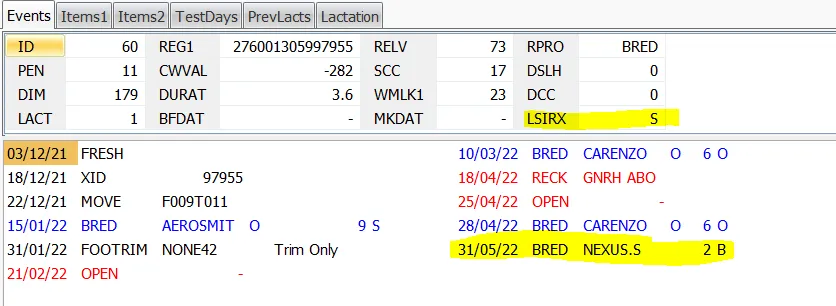
This is what the CowCard would look like if bred to sire NEXUS with the sexed code selected as "Sexed Female".
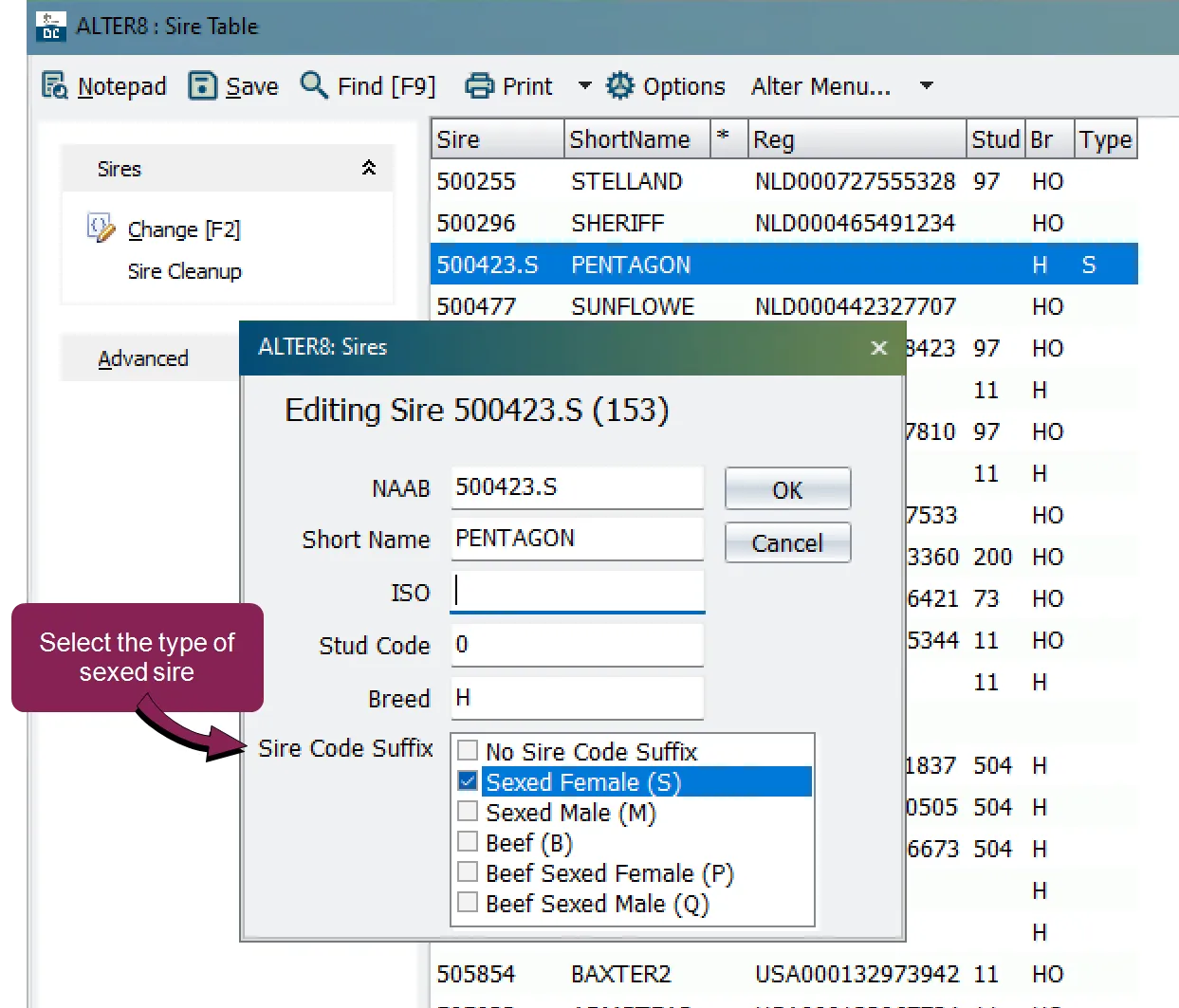
The more advanced method is to edit the sire in the ALTER8 Sires Configuration window. See Editing Sires in the ALTER8 Sires Configuration ]below for instructions, as well as some cautions, when using this advanced option..
This Sexed Sire feature targets herds that do not always use NAAB codes; it does not apply to NAAB‑coded sires.
In previous DairyComp versions before the Sexed Sire feature existed, the system would decode the NAAB code and automatically extract the breed, stud, and sexed code. This behavior does not change.
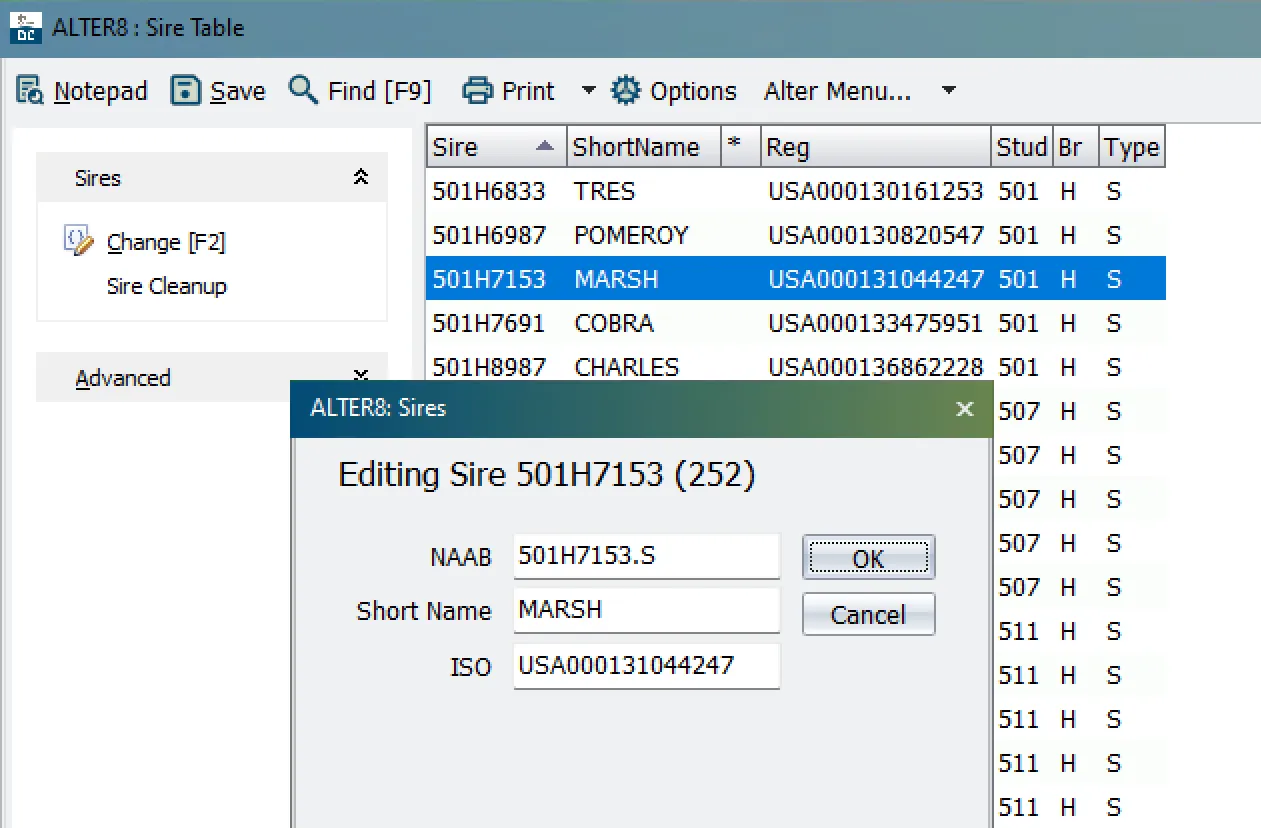
However, if you attempt to add a sexed code suffix to a NAAB‑coded sire in the current version of DairyComp, it will be stripped away and ignored. For example, the NAAB‑coded sire 501H7153 has an obvious Stud Code of 501 and a Breed of H, with a sexed code of S (which is determined by the stud code that is looked up the within DairyComp list that is populated via the published NAAB list https://www.naab-css.org/naab-marketing-codes ).
IMPORTANT: ALTER8 rejects the .S suffix if you attempt to add it to a NAAB‑coded sire. The example below shows the ALTER\8 Sire configuration window. It shows the 501H7153 NAAB code entered with a .S. After clicking OK, the suffix is ignored and not saved. This is also true if entering a BRED event using the 501H7153.S NAAB code; the .S suffix is dropped.
By contrast, ALTER8 allows the .S suffix when you add it to a non‑NAAB‑coded sire. The example below shows ALTER\8 while editing a non-NAAB coded sire in a non-US herd. With this option, you are able to select from the Sire Code Suffix list to designate the sexed sire.
Normally, type 190 "Sire Items" has been used to show the various parts of a sire that can be extracted as items. Like every item, there are two operators ("ops"), and for type 190:
- The first operator is the sire item to be referenced, usually SID, and could also be LSIR, SIRC, etc.
- The second operator (Op2) designates the sire value to be displayed for the item specified in the first operator.
Example — Item Type 190 for Sire 29H19625:
Op2 | Example | Description |
|---|---|---|
0 or 2 | 29H19625 | Default field, NAAB where available |
1 | LAKER | Sire Name |
3 | 840003209481114 | ISO value, using user preferred display option |
4 | H | Breed |
5 | 29 | Stud Code |
6 | NS or AI | Based on stud code, not common, specific to some EU countries |
7 | Offspring Gender | S, M, B, P, or QSee Sexed Sire Items below for details. |
8 | 840003209481114 | ISO as numeric |
9 | US003209481114 | ISO as alpha-2 country |
10 | USA003209481114 | ISO as alpha-3 country |
11 | ABS | Stud Name |
If you create a type 190 item with an Op2 of 7, it is displayed as a character, with this table:
Code | Meaning |
|---|---|
blank | Unsexed |
S | Sexed Female |
M | Sexed Male |
B | Unsexed Beef |
R | Sexed Female Beef |
Q | Sexed Male Beef |
Sexed Sire items can be selected in the command line. See the table below for examples:
Name | Type | Op1 | Op2 | Meaning | Example |
|---|---|---|---|---|---|
SIDSX | 190 | SID | 7 | Sexed coded of animal sire | SHOW ID SIDSX FOR SIDSX=SShow daughters of sexed sires |
LSIRX | 190 | LSIR | 7 | Sexed code of last sire used | SHOW ID LSIRX FOR LSIRX=SShow animals bred last to a sexed sireSHOW ID LSIRX FOR LSIRX=BShow animals bred last to a beef sire |
SIRCX | 190 | SIRC | 7 | Sexed code of conception sire | SHOW ID SIRCX FOR SIRCX=SShow animals pregnant to a sexed sireSHOW ID SIRCX FOR SIRCX=BShow animals pregnant to a beef sire |
The example below is from a German herd, with shortnames enabled.
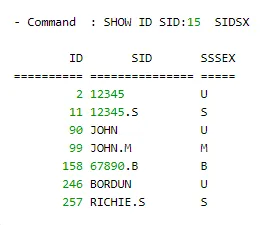
As displayed in the example above, sire 12345 is unsexed, but there is also a sire entered as 12345.S, which set sire Sexed Code to Sexed Female, and is displayed as S, which represents the primary goal for this feature.
Logic for showing the sexed code used the following priority:
- If the sire name is a NAAB code, that determines the code, based on the stud in the NAAB, which is used to set the sexed indicator. This remains unchanged and NAAB takes precedence as you cannot designate sexed codes for NAAB sires. Also, you cannot enter 7H1234.S - ENTER as 7H1234 will be displayed as the NAAB code and DairyComp will ignore the attempt to designate the sexed code.
- If the internal sexed code was set via entry such as 12345.S, or in ALTER8 editing, it is used for the indicator.
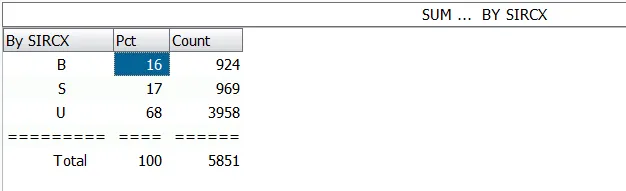
The example below shows the breakdown of conception sires by sexed code. As displayed, 16% of the existing pregnancies are to beef bulls and 17% are to sexed female sires.
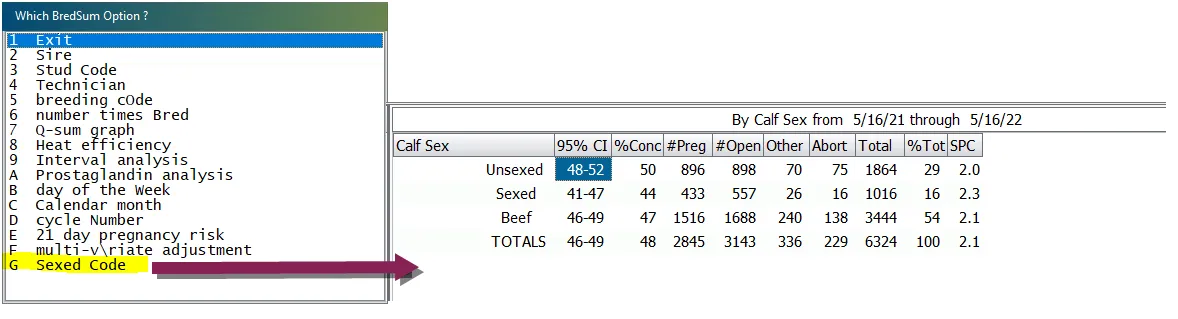
BREDSUM can be summarized by sexed codes as well. Use the option displayed below or the BREDSUM\* command.
A sexed‑coded sire exists as a separate entity in the sire table. 12345 and 12345.S are both in the sire table, at different indexes. However, they still represent the same genetic animal, and when DairyComp updates data from the sire table, both 12345 and 12345.S will be updated with the same data. They have the same name, ISO tag, etc.