SIRES Command
5 min
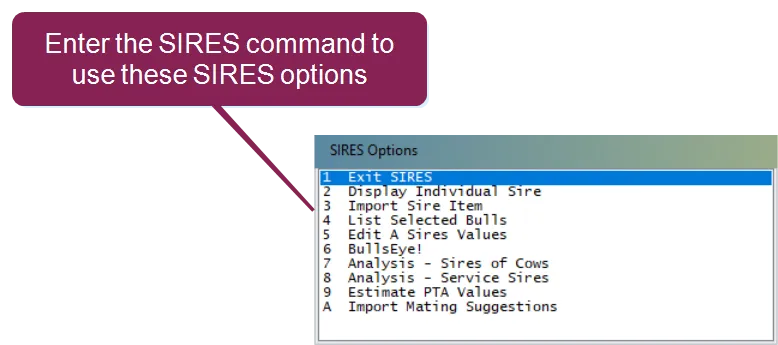
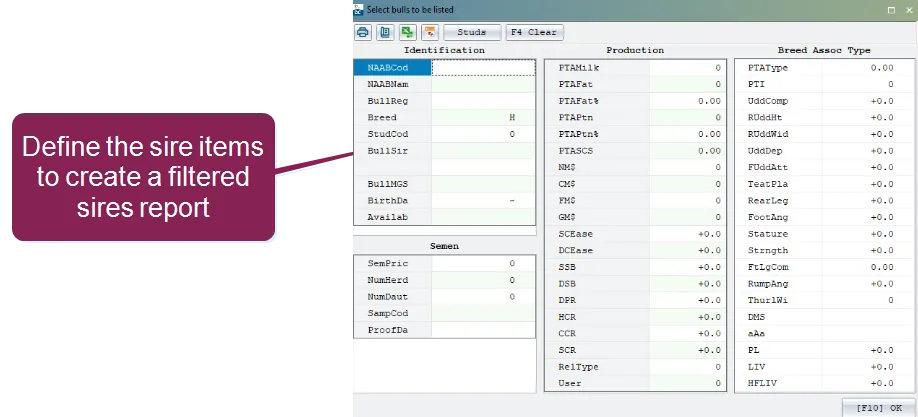
you can use the sires command to view information about individual sires in the dairycomp sire file the sire file is automatically updated within dairycomp every january and july from usda and breed association sire runs the sire file (dcsires dat) is a dairycomp data file that lists the information of about 800 sires the file is compiled from usda, naab, breed association, and type proofs it is then distributed twice a year to registered dairycomp users when you enter the sires command, dairycomp displays a pop up window with several options expand the topics below to learn more display individual sire as illustrated below, you can use the sires option display individual sire to view individual bulls from a pick list use the sort by buttons to display the list in order of naab code, short name , or registration number use either the arrow keys or type in the first letters of the bull you want to display in the pick list list selected bulls select the sires option list selected bulls to create filtered reports that only list bulls that meet the criteria that you set the system will display a blank bull form, and you can use the arrow keys to enter minimum values for most of the fields the semen cost and scc fields are used for maximum values use the right mouse key to select a bull the f2 key is used to view the bull at the top of the list the f3 key is used to limit the selection of certain studs the f4 key is used to reset all current fields to zero the f5 key is used to change the default sort order of the report press f10 when you are satisfied with the selection values next, the system displays a list of all the sire items, and you can enter these item numbers to add or delete the items from the report if you enter a zero, the system will automatically generate the report then, you can view or print the report in the browser edit sires values this option allows you to select a bull and change any of its values, as well as update semen prices bullseye! please contact vas support docid\ erznbnh1ww36p9q6rnppv for more information on this option analysis – sires of cows if you select this option, the system reviews the sires (item sid) of all cows and determines the average values for each sire field analysis – service sires when you select this option, the system automatically reviews all sires from breeding events and determines the average values for each sire field it also displays the number of sires in the cowfile estimate pta values this option allows you to calculate the average values of a parent or offspring using dam and sire information for more information, please contact vas support docid\ erznbnh1ww36p9q6rnppv import mating suggestions mating information can be imported and saved through two options through the sires command, you can select the option import mating suggestions or enter the command sires\m when using this command or selecting this option, you can load or import mating files into dairycomp from outside sources typically, planned sires for breedings will be given the id sir1 and sir2 additional sires may be added and will be listed as sir3 and sir4 note mating files must be loaded as a csv file to run this command