Manage Drug Usage Transactions
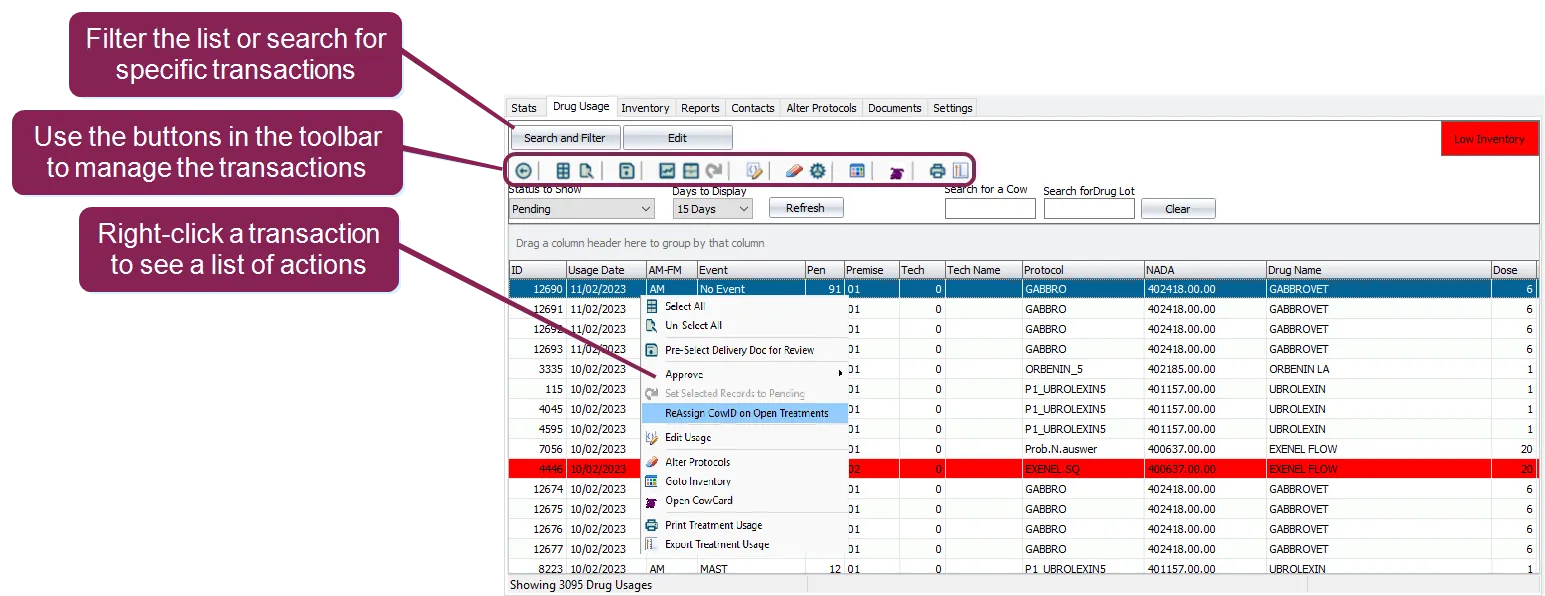
Use the Drug Usage page in CowCare to review, edit, and approve drug usage transactions. Open CowCare and then click on the Drug Usage tab to open the Drug Usage page:
Expand the topics below to learn more:
Use the toolbar at the top of the Drug Usage page and keyboard shortcuts to complete quick actions.

See the guidelines below for some pointers on using the page's shortcuts:
- Hover over each button to see its action. Here are some examples:
-
 Select Delivery Doc: Click to select the delivery doc/drug lot for the selected transaction.
-
 Edit Usage: Click to edit the values in a treatment. You can edit details like the dosage, how many days the drugs should be administered, and how long the milk or meat withhold will last.
-
 Alter Protocols: Click to open the Protocol screenProtocol screen to see protocol details for the selected transaction.
-
 Reassign Cow ID: Click to open the cow ID reassignment tool.
-
 Goto Inventory: Click to open the Inventory screenInventory screen and see inventory details for the selected transaction.
-
 Open CowCard: Click to open the selected animal's CowCardCowCard.
- Note the following keyboard shortcuts:
- Open a Cowcard: Press the F2 key.
- Print a Drug Usage report: Press the F5 key.
- Export a Drug Usage report: Press the F6 key.
Use the options below to approve a drug usage transaction:
- Approve Selected Transactions: Right-click on a transaction and select Approve > Selected or click the Approve Selected button on the toolbar.
- Approve All Transactions: Right-click on a transaction and select Approve > All
 or you can click the Approve All button on the toolbar.
- Automatically Approve All Transactions: Enable the Automatically approve current day usages option in SETUP. Be very cautious if you use this option—if you automatically approve transactions that should not be approved, the system could report negative quantities in the inventory.
Use the guidelines below when approving transactions:
- When you approve a transaction, the system will deduct quantities from each drug assigned to the protocol.
- To move an approved transaction back to Pending, right-click the transaction and select Set to Pending or click the Set to Pending button on the toolbar.
- To approve a transaction, you must select the proper Drug Lot unless you have disabled the Use CowCare Inventory option in Settings.
- DairyComp will not approve a transaction for the following reasons:
- If you enabled the No usage approval if no inventory option, the system will not approve the transaction if the drug is not in stock in any Drug Lot. If you have not enabled this option, the system will just select the most recent Drug Lot on file for the transaction.
- If you enabled the Don’t approve treatment if missing Delivery Doc option, then the system will not approve the transaction if the drug is in stock, but there is no Delivery Doc.
To edit a transaction, right-click the transaction and select Edit Usage or click the Edit Usage button on the toolbar. Make your edits and save your changes:
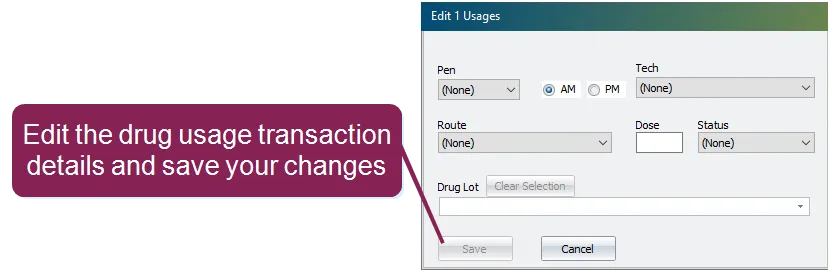
You can also edit multiple transactions at the same time if you select multiple transactions that use the same drug. Hold your Shift or Ctrl key and click on the transactions you want to edit at the same time.
Sometimes, a cow's ID may change, or a treatment might have been mistakenly entered for an incorrect cow ID. CowCare provides a dedicated tool to manage this situation, allowing you to reassign treatments to a different cow ID or disable open treatments entirely.
IMPORTANT: This functionality applies only to open (unapproved) drug usage transactions. Treatments that have already been approved are part of the CowCare audit trail and cannot be changed or reassigned using this tool.
There are two ways you can open the Cow ID reassignment tool. First, select the applicable animal from the transaction list, and then:
- Right-click on the transaction and select Reassign CowID on Open Treatments from the action menu.
- Or, select the Cow ID reassignment tool button on the toolbar.
The Reassign/Disable Cow ID window then displays:
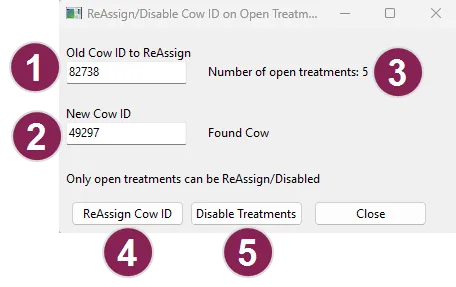
Old Cow ID to ReAssign: This field automatically shows the ID for the cow you selected from the transaction list (though you can change this ID manually). This could be an ID that no longer exists or was entered by mistake.
New Cow ID: Enter the ID of the cow to which you want the open treatments reassigned.
Number of open treatments: This field shows the number of currently open treatments for the selected cow.
ReAssign Cow ID: Click this button to reassign all the currently open treatments to the new cow ID.
Disable Treatments: Click this button to disable all currently open treatments for the selected cow ID.