Breeding Entry using DairyComp
4 min
🎓In This Guide, You Will Learn:
- What information is required with a breeding entry.
- How to enter a breeding in DairyComp.
- How to speed up entries using SIR5.
Required Information for Entry
Five key data points are required to enter a BRED event in DairyComp. These are important for future data analysis using BREDSUM.
- Cow number
- Breeding Date
- Service Sire
- Technician
- Breeding Code
Entering the BRED Event in DairyComp
- Enter BRED on the command line or select it from a dropdown menu.
- Enter the cow ID.
- Enter the breeding date.
- Enter the sire of breeding or select the sire from the list that is displayed in the breeding entry box.
- Enter the technician (person who bred the cow).
- Enter the breeding code.
- Enter the ID of the next cow and repeat the above steps.
- When finished, click OK or enter zero to exit. DairyComp does not allow a cow ID of zero and will exit the entry when a zero is entered.
💡TIP: If entering several cows bred with the same breeding date, sire, technician and breeding code use the * key to repeat the entry for the next ID. For example, a technician bred cows 606, 710 and 940 today to the same sire and breeding code:
- Enter the BRED event for cow 606
- Enter 710*
- Enter 940*
Speed Up Entries with SIR5 Setup
SIR5 setup can be used to display the last 5 sires used today for breeding entries. This helps streamline the sire choice entry.
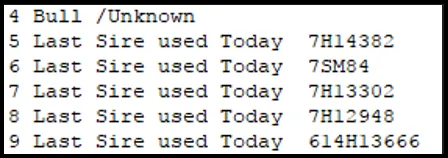
Follow these steps:
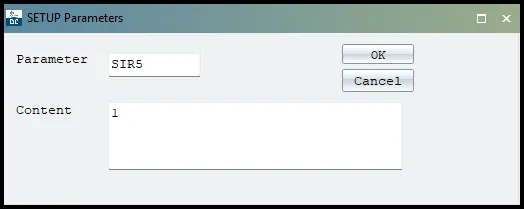
- Enter SETUP on the command line, then select the Parameters tab.
- Select on ADD
- Enter the Parameter: SIR5
- In the Content box, enter: 1
- Select OK
- Select OK (top right corner) to exit.
 Follow this link to continue with the next guide: Breeding Entry using PCC