---
title: What's New in FeedComp?
slug: help/en-us/feedcomp/whats-new
docTags:
createdAt: 2026-02-09T13:08:51.941Z
---
Check out the latest features and improvements in FeedComp.
:::hint{type="warning"}
⚠️ **IMPORTANT:** **Update all devices to the latest version** to maintain a reliable connection and avoid sync issues. Using different versions of the app at your farm can cause app loading delays during feeding. VAS recommends setting all feeding devices to auto-update. See [FeedComp App Auto-Update](docId:0KsmYkQEONwzJWyC8pEb0) to learn more.
**REMINDER FOR FEEDERS:** Be sure to keep the FeedComp app running whenever you are out feeding. Do not close the app or lock your device until active feedings are completed.
See FeedComp [Tech Specs](https://vas.com/technology-specifications/#FeedComp) and [System Requirements](https://vas.com/feedcomp-minimum-system-requirements/) to confirm your devices meet all requirements.
:::
## FeedComp Release v1.4.4083 - September 2026
This release focuses on improving device connectivity and giving you more flexibility when managing overnight loads.
### Enhancements
- **Detailed feeding history:** The [Feed History report](docId\:sNFXayQXWiARjJjnQGD8w) now includes more details to help you troubleshoot feeding issues. You can now see the actual time delay between steps, and any ingredients or pens that were skipped are now highlighted for better visibility.
- **Flexible overnight load options:** If an overnight load is started by mistake or plans change, you can now abort the load or choose **Start dropping** to deliver the feed right away. This prevents mixer equipment from being locked up unnecessarily.
- **Automatic scale reconnection:** The app now automatically resumes searching for your Bluetooth scale whenever you bring FeedComp back to the foreground, ensuring your scales reconnect without needing to restart the app.
### Bug Fixes
- ~~**MOBILE ONLY**~~ **Overnight load unlocking:** Resolved an issue where scheduled feedings could become locked or greyed out after being paused, allowing you to select and resume overnight loads as expected.
- ~~**MOBILE ONLY**~~ **Scale connection stability:** Fixed intermittent connection drops during extended idle periods and resolved issues where scale details failed to persist after reconnecting.
## FeedComp Release v1.4.4005 - September 2026
This release focuses on bug fixes and stability to give you a more consistent experience. These updates fix data syncing errors to help you keep reliable feeding records.
### Bug Fixes
The following improvements apply to the mobile app:
- **Improved data syncing:** Updated the sync process so one bad record no longer stops all your data from uploading.
- **Smoother app experience:** Removed a brief loading sound that played between ingredients and fixed a screen flickering issue on the Android home screen.
## FeedComp Release v1.4.3976 - August 2026
This release focuses on improving reporting accuracy, authentication stability, and visibility into the feeding process.
### Enhancements
The following improvements apply to FeedComp on PULSE:
- **Detailed feed history:** The Feed History report now provides more visibility into how loads were completed. You can see if a feeder manually advanced, ignored, or aborted specific ingredients or drops.
- **Improved drop tracking:** The Feeding History report now displays three values for drops: **Expected** (original schedule), **Adjusted** (recalculated based on actual ingredient loading), and **Actual** (what was delivered). These values provide a clearer picture of how loading errors impact pen delivery.
- **Accurate alternate recipe reporting:** When an alternate recipe is active, the original recipe's usage now correctly shows as zero, and its associated pens are greyed out. The alternate recipe page also inherits and displays the feedings from the recipe it replaces.
- **Load error report metric:** The system now displays an **Error %** on the Load Error Report in PULSE.
- **Refined ingredient projections:** Ingredient usage and projections now exclude scheduled premixes until they are actually fed. This change keeps the Ingredients page aligned with the Projections report for more reliable inventory planning.
### Bug Fixes
- ~~**MOBILE ONLY**~~** Authentication stability:** Resolved an issue where feeding devices could get stuck on a loading spinner or fail to log in due to expired tokens. The app now proactively refreshes tokens to prevent session interruptions.
- **Time zone accuracy:** Fixed a reporting discrepancy where feeding data times did not match the dairy's local time zone for farms in Mexico.
- **IOFC report accuracy:** Fixed a bug in the Income Over Feed Cost (IOFC) report where incorrect pen counts and missing premix costs caused inaccurate daily feed cost calculations.
## FeedComp Release v1.4.3911 - August 2026
This release includes new features for specific beta sites. For non-beta locations, your current FeedComp experience remains unchanged.
## FeedComp Release v1.4.3759 - July 2026
This release focuses on improving application stability and reliability, particularly for offline workflows and scale synchronization.
### Enhancements
- **Automatic device log uploads for all users: **All users, including non-feeders, now have their app logs automatically sent to VAS during the nightly reset. This helps our support team fix any technical issues you run into much faster.
- **Updated help links: **All Help buttons in the app now point to our new, improved Online Help Center.
- **Report filter settings don't change: **Report filters now work correctly. The filters stay in place when you switch between reports, making it faster and easier to compare report data.
### Bug Fixes
- **Faster scale reconnection: **Improved how the app communicates with Scale-Tec POINT scales. If you drive out of range, the app will now find and reconnect to your scale much faster once you’re back in range.
- **Persistent login sessions: **Fixed an issue that was causing the app to log users out too often. You should now stay logged in even after closing the app or syncing data, so you can get to work without re-entering your password every time.
- **Report access:** Resolved an issue where reports could not be opened because an inaccurate error message blocked access.
- **Zone integration memory: **The app now remembers your previously used zone integrations when you switch between dairies. You won't have to "re-activate" your device as often when logging back in.
- **Accurate first-ingredient loading: **Fixed a bug where leftover weight on the scale could cause the app to skip the first ingredient. The app now correctly zeros out the scale at the start of every new mix.
- **Ingredient editing crash: **Fixed a crash that happened when removing a location while editing an ingredient.
- **Batch feeding navigation: **Fixed the scrolling on the batch feeding screen so you can easily see and select pens at the bottom of long lists.
- **Improved audio stability: **Fixed issues where the loading alarm would keep buzzing even after you skipped or finished an ingredient.
## FeedComp Release v1.4.3688 - June 2026
This release focuses on improving application stability and reliability, particularly for offline workflows and scale synchronization.
### Bug Fixes
- **Offline stability for Android devices: **Resolved a critical issue where the application would crash on Android devices when starting a batch premix load in offline mode.
- **Restored offline weighback functionality: **Feeders can now perform weighback loads without an active internet connection.
- **Improved audio stability: **Addressed a stability issue where missing volume settings could cause the application to crash during a load.
## FeedComp Release v1.4.3660 - June 2026
### Enhancements
- **Improved Topcon auto-advance: **For a smoother feeding process without manual intervention, the app now includes improved auto-advance behavior. If the scale doesn't signal that you've reached the correct weight, the app automatically moves to the next ingredient after 3 seconds. This supports a more efficient feeding process even if there are minor communication delays with the scale.
### Bug Fixes
- **Feed history missing mixer: **We fixed an issue where the mixer name was occasionally missing from load and drop histories in PULSE.
***
:::ExpandableHeading
## Tips, Known Issues, and Workarounds
The FeedComp team is working hard to bring you new features and enhancements, but some updates may not be fully ready or supported yet. Review the list of tips, known issues, and workarounds for FeedComp:
**Other Known Issues**
- **Uninstall and redownload FeedComp if the app won't open**: Uninstall your current version of FeedComp, then download the latest version. You can search for FeedComp in your device's app store or tap these links from your device: [Android](https://play.google.com/store/apps/details?id=com.vas.mobile.feednext) or [iOS](https://apps.apple.com/us/app/feedcomp/id6481264460).
- **Use online **mode** to ensure data is synced and saved correctly**: Whenever possible, use online mode in the FeedComp App when creating or editing ingredients or recipes.
- **Use standard workflows to ensure the best performance**: To ensure that the current version of FeedComp works correctly, avoid mixing units, editing during feeding, or switching devices mid-task.
- **Keep the app open during feedings**: For the best experience, keep the app open during feedings to ensure that feeding processes are not disrupted and everything runs smoothly.
- **Sync your data if completed feedings are still marked incomplete**: Make sure you sync the app data before manually completing a record from the Feed History report. Some feedings may appear **Incomplete** until the data is fully synced. This helps prevent losing or overwriting data that is already saved in the app.
- **Check your Feeding Schedule if you have multiple split feedings**: If you have multiple split feedings, check your Feeding Schedule to make sure that your feedings are ordered correctly. Reorder the feedings if needed.
- **Set the mixer's Drop Tolerance value to at least 1**: If you use a Topcon Digi-Star scale and the FeedComp App will not complete a drop or automatically advance to the next pen, make sure that the mixer's Drop Tolerance is set to a minimum value of **1**. If you use **0** for the Drop Tolerance value, the FeedComp App may not complete drops correctly. To update your mixer's Drop Tolerance, tap **Adjustments** at the bottom of the FeedComp App screen, tap **Equipment**, and select the mixer to make your changes.
- **Update ingredients stored in multiple locations: **If you store ingredients in multiple locations, make sure your ingredient data is updated correctly in all known locations. If you are not seeing accurate ingredient data in a known location, manually refresh the app. You can also update the recipe ingredient in the mobile app. If the old location is still visible, set the new location and the correct DM/AF, if needed.
***
:::
::::::ExpandableHeading
## Earlier Releases
:::ExpandableHeading
## FeedComp Release v1.4.3647 - June 2026
### Enhancements
- ~~****~~~~**MOBILE ONLY**~~** Framework upgrade: **We upgraded the core mobile framework to ensure compatibility with the latest mobile operating systems. This foundational update improves overall app performance and security, keeping your devices running smoothly.
- **Improved system logging:** We added advanced logging to the data sync and reset processes. This helps our support team to pinpoint the root cause of any future technical issues much faster, reducing potential downtime.
### Bug Fixes
- **Improved reporting accuracy:** Resolved multiple reporting issues to ensure more reliable data:
- Fixed an issue where ingredient costs were sometimes saved in the wrong units (tons vs. pounds), leading to incorrect usage costs
- Improved calculations for [Load Error](docId\:sNFXayQXWiARjJjnQGD8w) and [Drop Error](docId\:sNFXayQXWiARjJjnQGD8w) reports
- Fixed an issue where the [Drop Error](docId\:sNFXayQXWiARjJjnQGD8w) report did not include a pen if its drops exceeded the error tolerance threshold
- Eliminated duplicate feedings in [DM Intake](docId\:sNFXayQXWiARjJjnQGD8w) and [Feed History](docId\:sNFXayQXWiARjJjnQGD8w) reports
- ~~**MOBILE ONLY**~~** Reliable scale discovery: **We addressed several connectivity issues with [Topcon Digi-Star scales](docId:1mG2kfqVWauAQVNlFozKV). The app is now better at discovering and reconnecting to your scales, with additional improvements in progress.
- ~~**MOBILE ONLY**~~** Stability enhancements: **We made several updates to improve app reliability, including resolving issues that occurred when [switching user profiles](docId\:w3eUqOYDx8RmzbHVfAKFn) or starting an [overnight load](docId:8hCxBUb1xfseg6kqHmsN2) when no equipment was selected.
- ~~**MOBILE ONLY**~~** UI enhancements: **We corrected several alignment issues for a cleaner look and easier navigation throughout the app.
:::
::::ExpandableHeading
## FeedComp Release v1.4.3544 - May 2026
### Enhancements
- ~~****~~~~**MOBILE ONLY**~~** Automatic device log uploads:** FeedComp now automatically uploads device logs to VAS every night during the overnight feeding schedule reset. Previously, logs were only stored locally for two days, making it difficult to troubleshoot older issues. This background update ensures our Support team has the data they need to resolve your issues faster.
:::hint{type="warning" indent="1"}
⚠️ **IMPORTANT:** Make sure that your FeedComp device has an active data connection before and during the overnight reset to ensure the logs are successfully sent to VAS.
:::
- ~~****~~~~**MOBILE ONLY**~~** Feeding schedule and process improvements**: Fixed several issues affecting feeding accuracy and workflow. The Home screen now reflects the correct feeding count, with split feedings being tracked individually for completion. Tapping **Start Mix** now correctly displays and retains the selected recipe instead of briefly switching to a different one. We also fixed the auto-advance logic during loading and dropping to ensure valid weight data is captured before advancing to the next ingredient or pen, preventing negative load and drop amounts in Feeding History.
- **Offline sync enhancements**: Resolved multiple issues affecting offline sync reliability. Ingredient updates made offline now serialize and sync back to PULSE correctly, stale split "missing" feeding records are automatically cleaned up when parent feedings arrive during sync, and usage history logs now sync successfully even after server errors.
- **Feeder names in reports**: Reports now correctly display the feeder’s name for all offline actions, including scheduled, batch, and filler loads. This replaces the "dash" previously shown in reports, giving you better visibility into who performed each task.
- ~~**MOBILE ONLY**~~** Performance: **Optimized Feeding Schedule performance over cellular networks by reducing the amount of data being sent from PULSE.
### Bug Fixes
- ~~**MOBILE ONLY**~~** Edit Pen Fixes**: Resolved multiple minor interface issues on the Edit Pen screen for a smoother editing experience.
- ~~**MOBILE ONLY**~~** Authentication fixes**: Continuing to investigate and address login issues and excessive login prompts.
::::
:::ExpandableHeading
## FeedComp Release v1.4.3474 - May 2026
### Enhancements
- ~~**MOBILE ONLY**~~** Edit feeding amounts directly from the Pens page:** To help you work faster with fewer taps, feeding amounts (AF and DM/HD) are now editable inline from **Edit Pen**. You can update one or more feedings at once, and Target DM/HD automatically recalculates to reflect your changes. This works both online and offline.
- ~~**MOBILE ONLY**~~** Keyboard no longer covers input fields on certain devices:** Fixed an issue on specific iPhone and Android devices where the screen wouldn't scroll up when editing fields at the bottom of a list (ingredients, recipes, feedings, batch pens). The app now correctly focuses on the selected field across all supported screens and device types.
- **Optimized DM/HD handling: **We've made several behind-the-scenes improvements to how DM/HD values are calculated, synced, and reconciled to epen targets and feeding amounts stay consistent across online and offline workflows. These optimizations also address edge cases around recipe alternates, split feedings, and offline sync conflict resolution.
:::
:::ExpandableHeading
## FeedComp Release v1.4.3451 - April 2026
### Enhancements
- **Streamlined feeding amount edits: **To save you time and reduce navigation steps, you can now edit pen amounts directly within the **Edit Mix** screen. When you adjust a pen target, the app automatically recalculates ingredient totals in real-time, ensuring your load is accurate before you start mixing. This update also includes smarter capacity warnings and simplified data entry—using whole numbers for As-Fed (AF) and decimals for Dry Matter (DM/HD)—so you can make fast, precise adjustments on the fly.
- **Improved ingredient loading accuracy: **We have updated the FeedComp loading logic to ensure ingredient weights are recorded accurately in your reports. This fix stabilizes how the app handles scale fluctuations during ingredient transitions, specifically when acknowledging (ACK) multiple ingredients in a row. By filtering out scale "noise," the app now prevents incorrect or negative weights from appearing in PULSE, ensuring your feeding history and usage data are always reliable and accurate.
- **Improved data refresh and sync reliability: **We have updated the FeedComp mobile app to ensure your feeding data stays current, even when your device is offline or the app is running in the background. This fix resolves issues where completed loads failed to drop off the schedule or new data didn't sync correctly during the daily reset. As a result, you can rely on an accurate feeding schedule and reports every morning without needing to manually restart or reinstall the app.
- **Missing or incomplete load fixes: **We made several improvements to help prevent or diagnose missing or incomplete loads.
:::
:::ExpandableHeading
## FeedComp Release v1.4.3413 - April 2026
### Bug Fixes
- **Log export fix: **Improved how log exports are saved to the Downloads folder, making them easier to find and share with Support. Export messages were also updated to clearly confirm when logs are saved successfully or when action is needed.
- **Data logging and saving fix: **We improved how data is synced and saved to help prevent incomplete and missing loads.
- **DM/HD accuracy fix: **Weighbacks are now included in Dry Matter per Head (DM/HD) calculations, resulting in more accurate values. The corrected DM/HD values are shown in the [DM Intake Report](docId\:sNFXayQXWiARjJjnQGD8w) and on the [DM/HD History](docId\:sNFXayQXWiARjJjnQGD8w) tab for each pen.
***
:::
::::ExpandableHeading
## FeedComp Release v1.4.3388 - March 2026
### Enhancements
**Improved premix reporting: **In this release, we made it easier to identify and distinguish premixes (and their ingredients) from recipes in the following reports:
- In the [Projections Report](docId\:sNFXayQXWiARjJjnQGD8w), use the new **Expand Premix Ingredients** toggle to control how premix ingredients are shown in projections to prevent double counting.
:::ExpandableHeading{indent="1"}
**How does the toggle work?**
- When **disabled**, premix and recipe ingredients are listed separately. Each premix is shown as a single projected total that includes all of its ingredients. You can expand the premix name to see ingredient-level details.
::Image[]{src="https://platform-docs.vas.com/en-us/Content/Resources/Images/Platform/feedcomp-img/web/fcp-26mar-projections-enabled.png" size="40" width="1322" height="719" position="flex-start" darkWidth="1322" darkHeight="719" showCaption="false" indent="1"}
- When **enabled**, ingredients are grouped together whether they are used in a premix or a recipe. Each ingredient has a single projected total, and ingredients used in premixes are marked by an asterisk (\*).
::Image[]{src="https://platform-docs.vas.com/en-us/Content/Resources/Images/Platform/feedcomp-img/web/fcp-26mar-projections-disabled.png" size="40" width="1262" height="632" position="flex-start" darkWidth="1262" darkHeight="632" showCaption="false" indent="1"}
:::
- The [Ingredient Usage Report](docId\:sNFXayQXWiARjJjnQGD8w) now lists whether ingredients are used in premixes or in regular feedings, so you can fully understand your actual ingredient costs and better forecast your herd's feeding needs.
***
::::
:::ExpandableHeading
## FeedComp Release v1.4.3343 - March 2026
### Bug Fixes
- **Data sync: **The app now refreshes and syncs data as expected.
- **Incorrect drop amounts: **Improved how the app handles incomplete feedings to avoid showing a drop amount of 0 (zero).
- **App opening: **Resolved an issue that caused the app to stall on the opening screen and fail to open.
***
:::
:::ExpandableHeading
## FeedComp Release v1.4.3280 - February 2026
### Bug Fixes
- **Decimal value fix: **Improved metric and imperial decimal handling.
- **More incomplete load improvements: **Further optimized the system to prevent incomplete loads.
***
:::
:::::ExpandableHeading
## FeedComp Release v1.4.3256 - February 2026
### Enhancements & Bug Fixes
::::VerticalSplit{layout="middle"}
:::VerticalSplitItem
~~****~~~~**WEB ONLY**~~ **Reports now show the cost of errors. **The Load Error and Drop Error reports now include an **Error Cost** column, which shows the price incurred by exceeding the set loading or dropping amount. Open either report in Table View to keep track of all error costs, so you can better identify and prevent expensive mistakes in the future.
:::
:::VerticalSplitItem

:::
::::
***
::::VerticalSplit{layout="middle"}
:::VerticalSplitItem
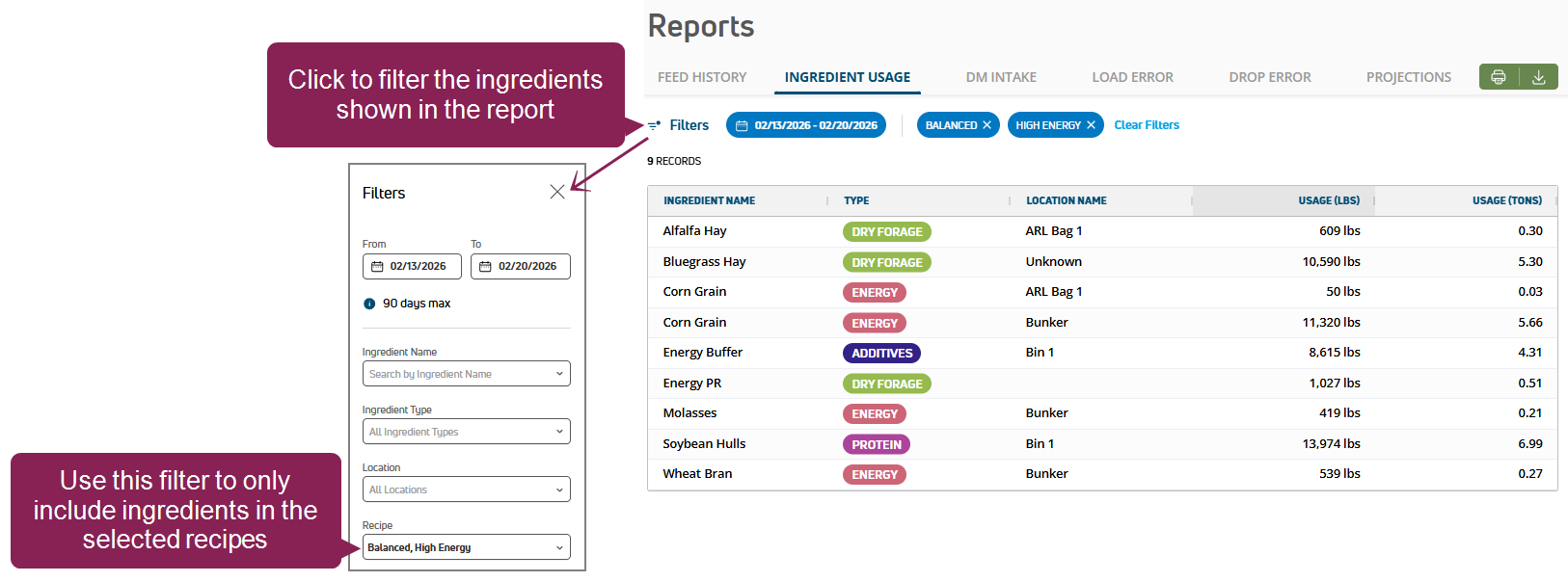
~~****~~~~**WEB ONLY**~~ **New recipe filter for the Ingredient Usage report. **You can now filter the report to only list ingredients from the selected recipe. Use this filter to guide your feeding decisions. For example, if a recipe uses too much of an ingredient, you might want to distribute a different recipe or restock the ingredient more often.
:::
:::VerticalSplitItem
:::
::::
***
- **Weighback fix: **Fixed the Weighback process so the app stays open when adding ingredients.
- **Scale sync fix: **Improved the app logic so the tablet weight and scale weight sync during drops.
- **Incomplete loads prevention: **Optimized the system to reduce the likelihood of incomplete loads.
- **Ingredient location fix: **Improved how the app displays and updates ingredient data if ingredients are stored in multiple locations. If you are still not seeing ingredient data in a known location, manually refresh the app or update the recipe ingredient in the mobile app. If the old location is still visible, set the new location and the correct DM/AF, if needed.
***
:::::
:::ExpandableHeading
## FeedComp Release v1.4.3239 - February 2026
### Bug Fixes
- **Drop fixes: **Improved how the FeedComp App reads data from Topcon Digi-Star scales, eliminating NaN errors and ensuring that drop sequences are handled correctly in the flow.
- **Scale sync fix: **Improved how the app manages scale disconnect and reconnection attempts. If the scale connection is lost, the app now clearly shows a “Disconnected” status and attempts to reconnect more quickly.
***
:::
:::::ExpandableHeading
## FeedComp Release v1.4.3225 - February 2026
### Enhancements
~~****~~~~**MOBILE ONLY**~~ **Manage pens in offline mode: **You can now make pen adjustments when your device is in offline mode, including editing pen details and enabling or disabling pens. When you reconnect your device, your updates will be synced so your data stays accurate and consistent across all devices.
***
::::VerticalSplit{layout="left"}
:::VerticalSplitItem
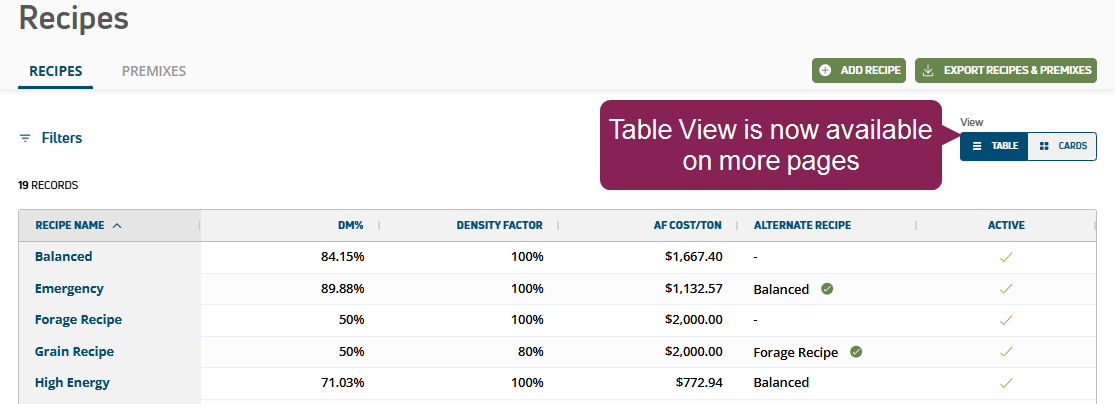
~~****~~~~**WEB ONLY**~~ **Added Table view to more pages: **Switch to **Table** view in the upper right corner to easily review *Inventory*, *Recipes*, *Reports*, and more.
:::
:::VerticalSplitItem
:::
::::
***
:::::
:::ExpandableHeading
## FeedComp Release v1.4.3206 - February 2026
### Bug Fixes
**Scale/weight data fix:** Updated the app to improve how weight data is processed, ensuring more consistent and accurate readings from the scale.
***
:::
:::ExpandableHeading
## FeedComp Release - January 2026
### Enhancements
~~~~~~**NEW FEATURE**~~ **FeedComp and WeighComp now sync data automatically!** Our powerful feed and inventory tracking solutions now share data whenever the FeedComp app is connected, keeping your records accurate and consistent across both apps. Whether you log a new feed shipment in WeighComp or update an ingredient in FeedComp, your inventory stays updated without any extra steps. Note that FeedWatch users with an existing WeighComp integration will be able to convert to FeedComp in a future release.
***
:::
:::ExpandableHeading
## FeedComp Release v1.4.3147 - January 2026
### Bug Fixes
- **Duplicated drops**: Fixed an issue where drop data was being duplicated in the system and causing inflated dry matter intake and feed costs in reports, including the [Income Over Feed Cost Report](docId\:gDpY30LEiGN2babK2JoyW).
- **Batch Feedings cost fix**: Corrected cost calculations for Batch Feedings to improve the accuracy of the [Income Over Feed Cost Report](docId\:gDpY30LEiGN2babK2JoyW).
- **Ingredient Usage fix**: Updated the [Ingredient Usage Report](docId\:D2Sza84_jTiHuvI5yUZOe) to display correct usage values.
***
:::
:::ExpandableHeading
## FeedComp Release v1.4.3131 - January 2026
### Enhancements & Bug Fixes
- ~~****~~~~**ENHANCEMENT**~~ **FeedComp automatically configures Scale-Tec POINT scale display settings: **When you connect to a Scale-Tec POINT scale, the app now automatically checks your display settings and corrects them if needed. To learn more about configuring and connecting scales to the app, see [Scales](docId\:Dmb4s0VXPOTO-m3uj1oRF).
- **Stay logged in after force close:** If the FeedComp App closes unexpectedly, you'll stay logged into your account so you can quickly get back to work.
***
:::
View [Earlier Releases - 2025](docId\:T2ERvKh1hOBT7ovFGcB_N).
::::::